


Bundle & Save - All Four Drivers - One Low Price:
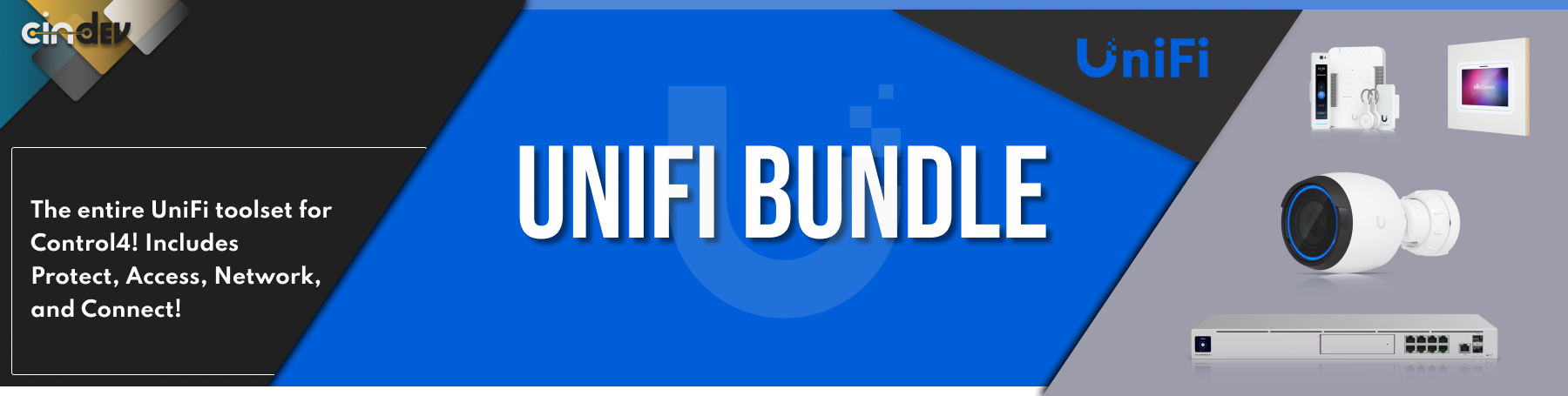

The UniFi Protect Camera Driver for Control4 delivers seamless integration with UniFi's G3, G4, G5, G6 and AI Protect cameras, enabling dealers to unlock powerful automation and customization capabilities. With support for advanced camera-triggered events, this driver enhances security, convenience, and efficiency within the Control4 ecosystem.

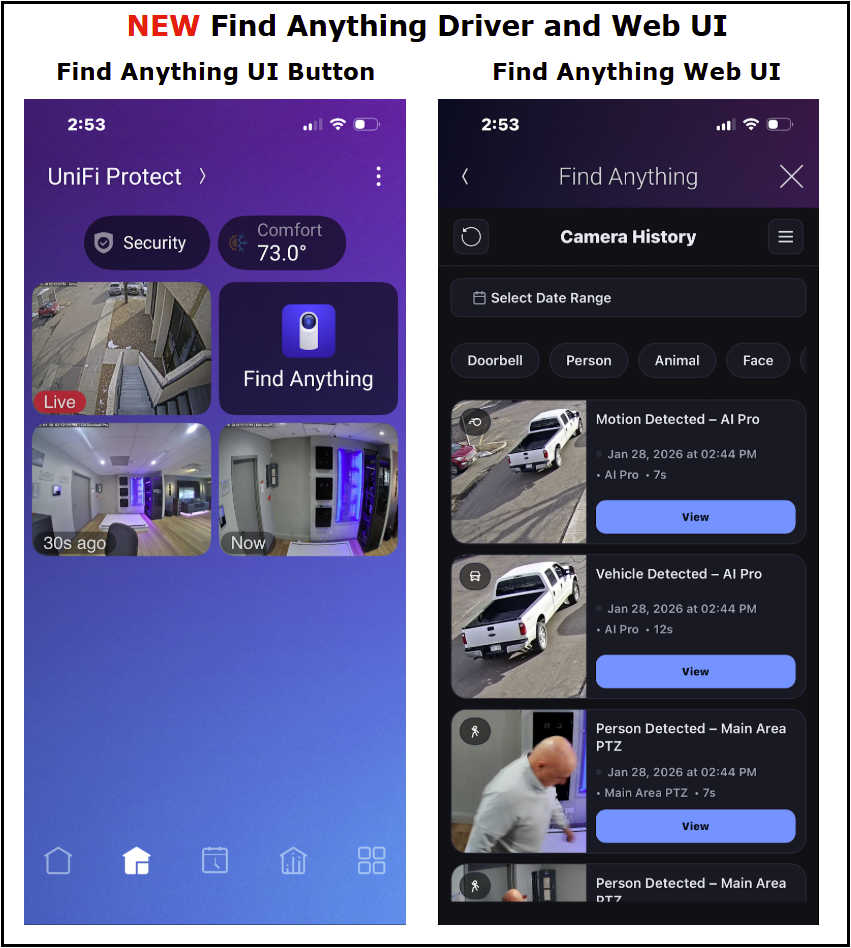
NEW Driver Added - Find Anything Web UI Driver
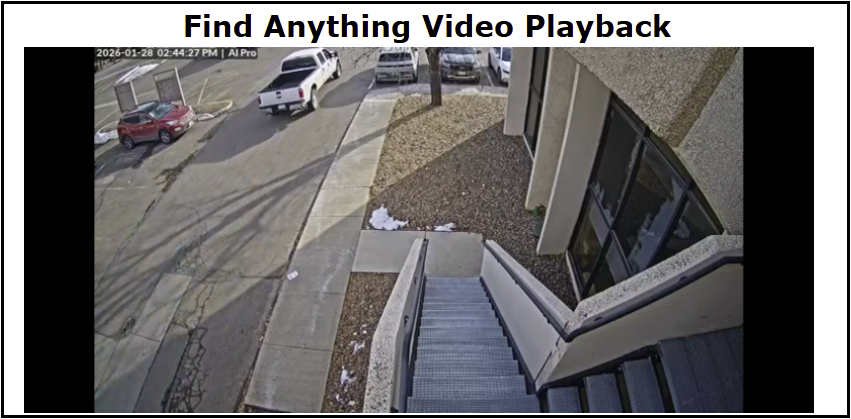
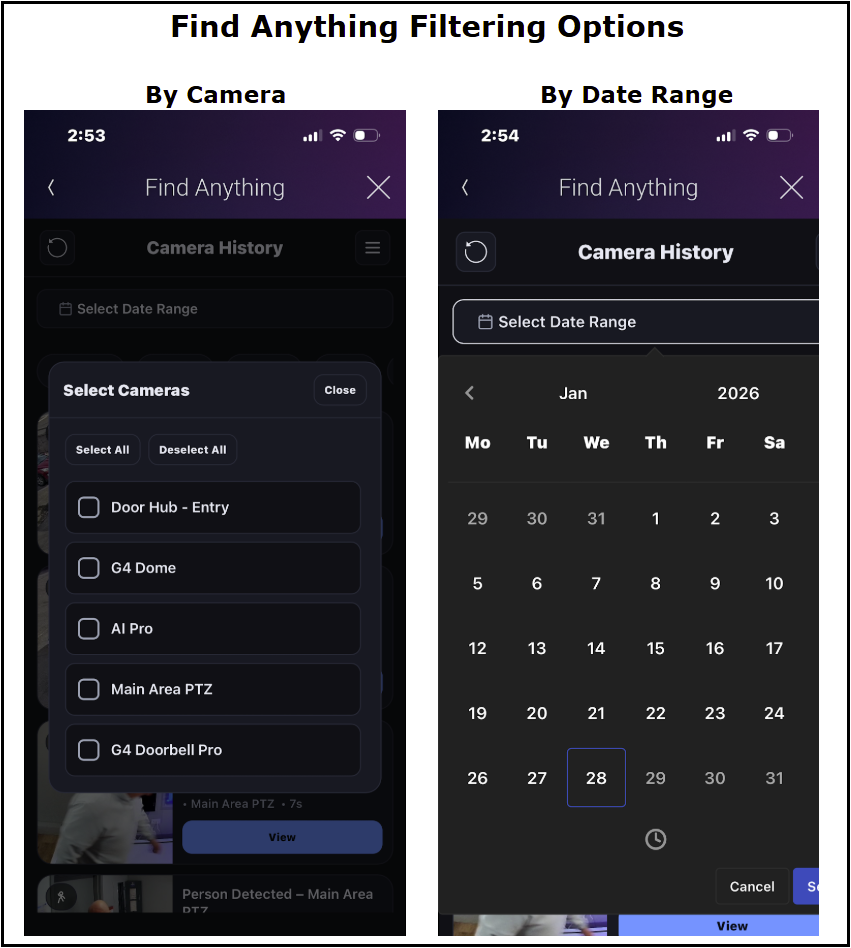
- Event History with video playback and filtering options - Available on T4 Touchscreens and OS 4.0 and higher
- Event History and filtering available on OS3
- Driver Add Driver - with the click of a button all protect devices are loaded into the Control4 project.
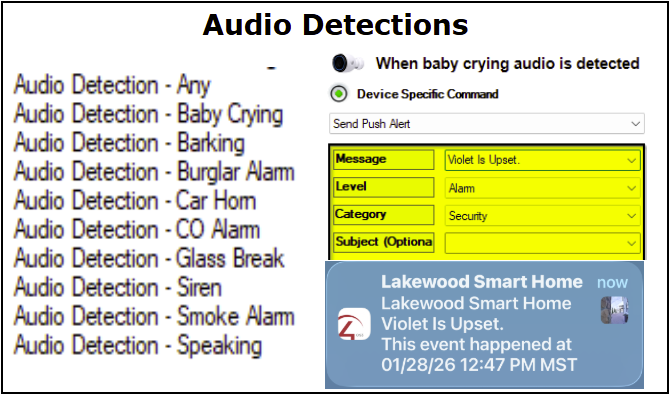
- Audio Detections - do smart home programming and notifications off any Audio Detection Event.
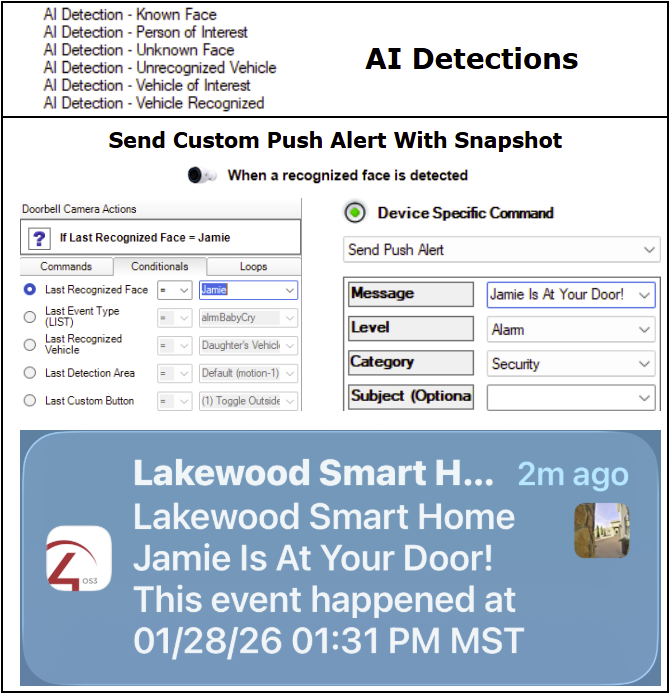
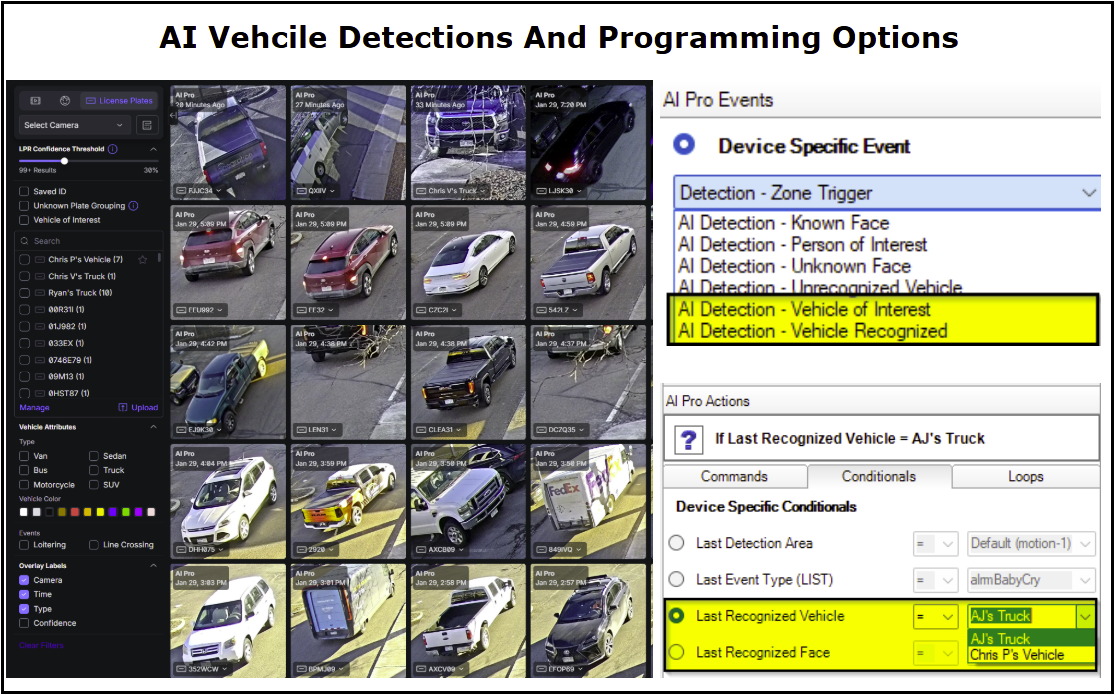
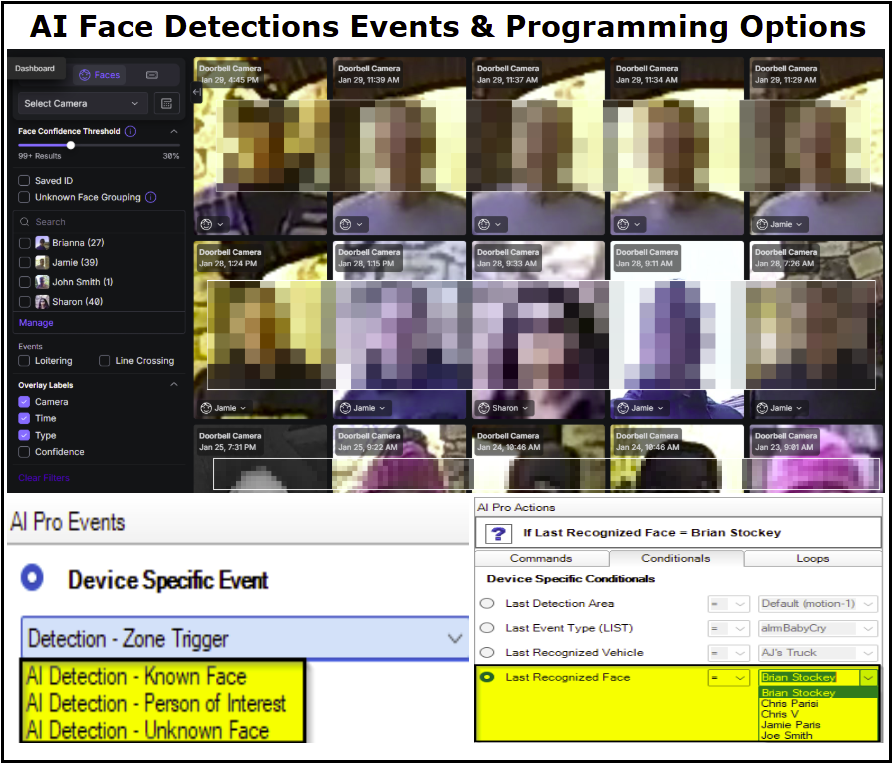
- AI Detections - include Known Face, Person Of Interest, Vehicle Of Interest and Vehicle Recognized.
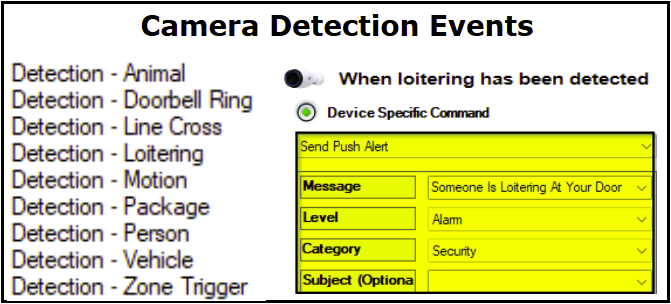
- Camera Detections - include Line Cross, Loitering, Motion, Package, Person, Vehicle and Zone Triggered.
- Doorbell Detections - include Doorbell Ring and LCD Message Changed events.
- Pro Doorbell events include package, fingerprint and NFC card authentication events.
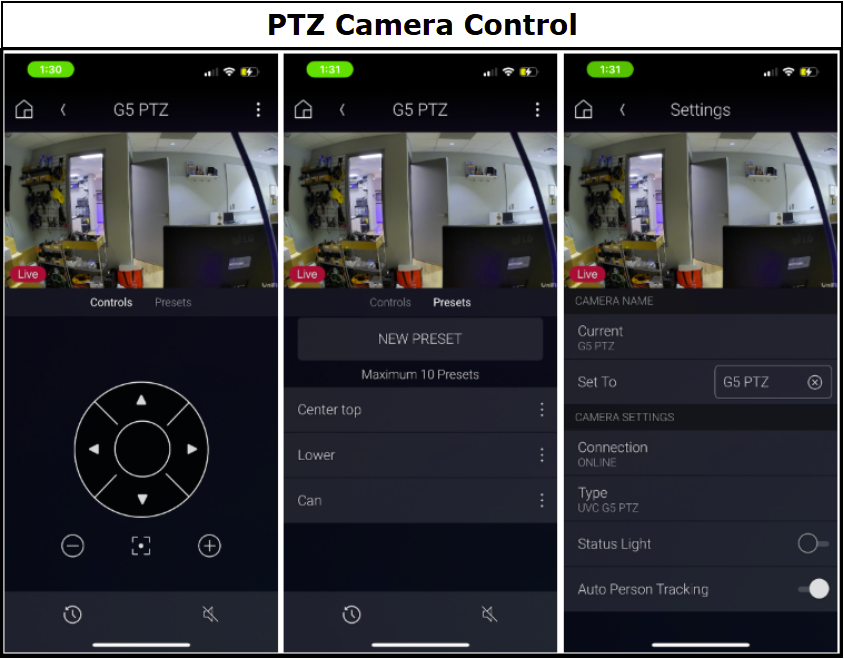
- Advanced PTZ control include pan, tilt and zoom control as well as preset functionality and person tracking
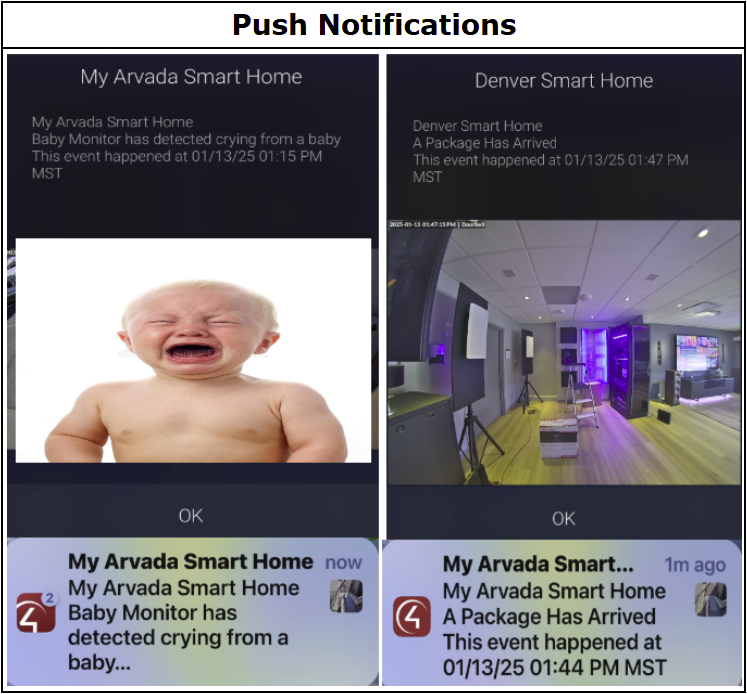
- Push Notifications - easily send a push notification with a snapshot of any camera for all event-based alerts.
- Email Notifications - send your client an email with a snapshot from any camera for all event-based alerts.
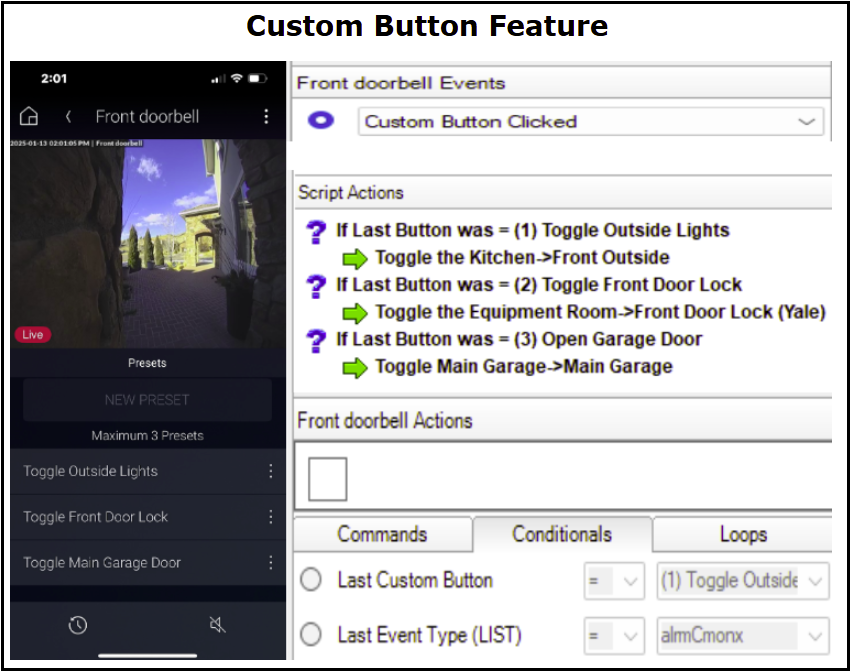
- Custom Buttons - set up and use custom buttons inside the camera view in the Control4 app to unlock a door or turn on a light.
- Conditional Programming Support - easily program off of camera event conditionals like Last Detected Area, Last Event Type, Last Recognized Vehicle, Last Recognized Face and Last Custom Button Triggered.
- Webhook support - for programming beyond standard driver capabilities
- UniFi Sense Integration - works with most Sense devices allowing even more customization off sensor events
- ViewPort Integration - to view and stream camera views on your TV. Easily setup a live camera view when your doorbell is pressed on your TV.
- Protect Floodlight - integration supported

The UniFi Protect Camera Driver for Control4 offers versatile integration capabilities that enhance security and automation within smart homes. Here are some practical use cases:
- Enhanced Security Monitoring
- Automatically turn on lights when motion is detected in key areas
- Send instant notifications with snapshots for unusual activity
- Intelligent Doorbell Monitoring
- Notify users of visitors with live video feeds and custom chimes
- Display personalized messages on the doorbell's LCD screen
- Smart Detection Automation
- Trigger lights or start recordings when people or vehicles are detected
- Automate responses to specific events like package deliveries


- UniFi Protect Cameras (AI Series, G6, G5, G4, G3, Doorbell, Doorbell Pro Cameras)
- UniFi Viewport
- UniFi Protect Floodlight
- UniFi All-In-One Sensor
- UniFi Environmental Sensor
- UniFi Siren
- UniFi Entry Sensor
- UniFi Motion Sensor

A single license will unlock as many instances of the driver as needed in your project. Cloud Driver is required to activate all DriverCentral licenses and trials. To find out more about drivercentral features click here. Additionally, here is a quick video that demonstrates the licensing process.

All Cinegration Development drivers for Control4 come with a 30-day trial. Simply add the DriverCentral licensing driver along with this driver and you can fully test the driver before purchasing. Including Cinegration Development drivers in your showroom project will give you unlimited use without purchase.
- What does the UniFi Protect Camera Driver do?
The UniFi Protect Camera Driver integrates Ubiquiti's UniFi Protect camera systems with Control4, enabling advanced security monitoring, automation, and customization capabilities within a smart home environment. - Which UniFi Protect cameras are compatible with this driver?
The driver supports UniFi's G3, G4, G5, G6 and AI series cameras, including the UniFi Protect Doorbell, ViewPort and Floodlight devices. - Does the driver support AI features?
Yes, advanced AI analytics are available for G4 and newer series cameras. These include features such as vehicle detection, license plate recognition, and package detection. - Can users control PTZ (Pan, Tilt, Zoom) functions?
Yes, the driver provides full PTZ functionality for supported Protect cameras. Users can create, edit, rename, and reorder preset positions directly through the Control4 interface for easy real-time adjustments. - Is the driver compatible with the UniFi ViewPort?
Yes, the driver supports UniFi ViewPort devices, allowing live camera feeds to be displayed via HDMI connections. Users can switch between cameras or views with ease. - Do I need additional hardware to use this driver?
You’ll need a compatible UniFi Protect system, such as a Dream Machine Pro, NVR, Cloud Key+, or any supported UniFi cameras and devices. Additionally, the DriverCentral Cloud Driver is required for licensing and activation. - What version of Control4 OS is required?
The driver is compatible with Control4 OS 2.10.6 or higher. - Is there a trial available?
Yes, the driver offers a 30-day trial through the DriverCentral Cloud Driver, allowing you to test its features before purchasing a license. - How is the driver licensed?
A single license activates unlimited instances of the driver within a Control4 project. Licensing is managed through the DriverCentral Cloud Driver. - What support is available for this driver?
For support, documentation, and updates, visit the DriverCentral page for UniFi Protect.
Driver is provided by Cinegration Development LLC. All rights reserved.
Customer reviews

UniFi Protect Driver Set Up Instructions: CLICK HERE!
How To Guides:
Add Programmable Custom Buttons
Add Doorbell Pro Package Camera Stream

For a full description of terms and conditions pertaining to Cinegration Development's drivers please visit www.cindev.com/terms-and-conditions
- 20260129
- Added Find Anything Driver to Protect solution.
- Improved resiliency and reconnection between gateway and Protect.
- Fixed (sensor): Some events were not being show under Composer Events when they should have.
- 2026 Copyright update
- 20251224
- Fixed issue with Sensor driver not populating events since V20251222
- 20251222
- Improved UniFi Sensor tracking
- Improved Camera Snapshot in OS4
- Installed framework for future features.
- 20251208
- boolean values were not tracking correctly
- audio-alarm connection state was inverted
- properties now correctly show/hide
- Added External + Internal leak sensor inputs to match Protect sense devices
- Added ViewHistory to Sense
- Changed Audio-Alarm to Audible Alarm for clarity
- 20251107
- Fixed playing a Chime Tone from Programming
- Fixed Sense not connecting properly to "Temperature Display Driver"
- Added connections for Leak + Audio Alarm
- Fixed Sense leak alarm were not being allowed
- Fixed 2.10.6 issue with JSON decoding
- 20251025
- Added Protect Sense integration
- Added Driver Feedback button to Gateway documentation
- Added new Cindev/DriverCentral debug/ticketing integration
- 20250919
- Fixed issue when a PTZ preset was deleted on UniFi, it was not deleting the preset on Control4 as well.
- 20250903
- Removed block when gateway was not connected to UniFi to block Webhooks
- Improved rest communication when UniFi or Protect was locked up or crashing.
- 20250902
- Added Cindev Doorbell Integration to Protect Integration
- Fixed issue where polling would stop in certain situations (out-of-range errorCode)
- 20250818
- Fixed G2 Doorbell "ring" webhook (now monitored via two APIs for reliability)
- Added Restart Protect Device command to Gateway
- Added Refresh Communication command to Gateway
- Improved 429 error handling — now retries after 5 minutes (no reboot needed)
- Fixed RTSP mix-up between Package Camera and Doorbell Camera
- 20250611
- Added support for alternate streams even when using Onvif
- Added support for object based webhooks: Activity, Objects, Face ID, LPR license-plate. This will replace existing webhook integration and allows dealer to customize the monitored webhooks
- Improved debug statements between WSS vs Webhook Events
- Vehicle conditional now only displays known vehicles. Note: Vehicle conditionals now use saved ‘name’ of the vehicle not the license-plate (per UniFi Change).
- Fix: Vehicle conditional not working
- Fix: PTZ Presets could not be created if no presets had been created
- Fix: OS4 not showing consistently showing Live View
- Backend/Framework Updates and improvements
- 20250324 REQUIRES SYSTEM REBOOT
- Added ONVIF/3rd Party Camera Support (Not Guaranteed to work with all 3rd party cameras)
- Added AI Port integration
- Fixed issue if hostname was being used instead of IPv4 address
- Fixed PTZ presets not working
- Added support for UniFi Access Cameras
- Added support for sending Package Camera Snapshots
- Added conditional programming for Detection zones
- Fixed issue where cameras adopted by another UniFi system would cause errors
- Improved communication/processing for all device calls
- Fixed motion detection still showing even if the camera did not have Motion Events
- 20250104 - REQUIRES SYSTEM REBOOT
- - Fixed issue with Viewport selection not always working
- Driver now uses Webhooks for Event triggers - Watch Video
- Support for 2.10.6 (Webhooks/Events)
- Dynamic Camera Events
- Each camera will now only show Events that are allowed on that camera
- A reboot of the Controller is required if upgrading
- Added Vehicle Recognition
- Conditional (Last Recognized Vehicle) contains a drop down of all found license plates - Watch Video
- Removed: LastVechicleType, LastVehicleColor, LicensePlate Variables
- Added Face Recognition
- Conditional (Last Recognized Face) contains a drop down of all found faces and the tagged name for each - Watch Video
- Added Support for Custom Webhooks
- 20241209
- Fixed issue where legacy email notifications would not send properly when using a Role (owner/integrator)
- Fixed PTZ preset commands not working since 20241114
- 202401115
- Fixed issue where legacy versions of UniFi Protect would not load since Driver Version 20241114
- 20241114
- Added Fingerprint Events (Doorbell Pro, Protect 5.1.45+)
- Added NFC Card Events (Doorbell Pro, Protect 5.1.45+)
- Fixed issue where events would trigger on a reload of the driver even if they occurred in the past.
- Fixed ONLINE/OFFLINE state in Settings to be proper.
- Fixed Chime Event trigger not working
- 20241108
- Removed legacy code that is no longer in use
- Fixed issue with Email+ driver not able to send snapshots
- Improved snapshot speed
- Added Command: Set Recording Options
- 20241014
- Added double confirm to ‘Reload Gateway Connection’
- General improvements and code performance
- ViewPort Improvements:
- Fixed BLUE button not working
- New icon for ViewPort
- Added Refresh Communication driver action
- Added building cameras driver action (from Gateway)
- Added better conditional programming with custom live-views
- Light Improvements:
- Fixed Variable LED Status not working
- Added Advanced Lighting Support
- Added Default Brightness
- Property for selecting level
- Composer Command for adjusting dynamically in Composer
- Removed Last Event Property to improve performance of Director
- Added Set Brightness Composer Command
- Camera Driver Improvements:
- Tested all Camera Model for functionality (see Gateway Documentation for complete report)
- Improved organization and layout of Composer events, conditionals and commands
- Added Camera Event History
- Added Custom Buttons feature to Navigator
- Added all AI events (object, audio, etc…) as Composer Events
- Added/Fixed PTZ Control
- Added PTZ Preset creation, manipulation and deletion on PTZ cameras
- Fixed MOVE_TO not working from iOS when using a PTZ
- Added improved Settings page
- Customer can now change name of camera and it will also rename it in UniFi
- Customer can adjust the Status LED on the camera
- Customer and change the Doorbell Message
- Fixed issues where video would not be available on remote C4 iOS app
- Fixed Composer Command (Clear LCD Message) not working
- Added enabling Streams directly from Composer using a Driver Action
- 20231025
- Added Driver-Add-Driver
- The gateway driver can now add and configure cameras, lights and viewports with a single click (Driver Actions) - Added easy rtsp stream enabling
- Under Driver Actions, dealers can now enable all Low, Medium or High RTSP streams for all cameras connected to UniFi. This greatly improves installation speed/configuration. - Added UniFi Chime support
- The UniFi Chime can now be triggered via any Composer Event.
- Can adjust the speaker volume from a Composer Event. - Fixed issues with Viewport and triggering unallowed liveviews
- Improvement to Snapshots for Push + Email
- General backend updates
- Added Driver-Add-Driver
- 20230528
- Separated Refresh and Reload gateway connections
- Refresh will attempt to re-login and add/append any new data/cameras found
- Reload will remove connections and data stored in the driver for devices the user account no longer has access to or has been removed from the system
- 20230406
- Added Dynamic Preset feature
- This feature (disabled by default) allows dealers/customers to create buttons on the camera page to perform home automation actions. Examples would be 'Lights' to turn on/off lights in the camera view or 'Garage Door' which could toggle the garage door motor. - Added Settings feature
- This feature (enabled by default) allows customers to 'see' last detection information and general camera info - Added 'Home' button hiding
- Previously, the Home button was always available even if not being used for an advanced trigger action. OS 3.3.2+ allows drivers to dynamically adjust some of the navigator buttons. The home button is not 'hidden' by default. - Added PTZ controls
- UniFi G4 PTZ camera is now supported including Pan, Tilt and Zoom controls. Note: Some G4 cameras also have an optical zoom feature. If the camera supports this, the ability to adjust the zoom will automatically be added to Navigator.
- PTZ Preset triggers are also functioning - Improved customization of RTSP streams.
- OS3.3.2+ allows for customized RTSP parameters for better camera experience for customers. The driver now allows dealers to customize these parameters if needed. To adjust the parameters, change Stream Settings Property to 'Manual' and you will be given the following options:
- Stream Type, RTSPS enabled, Resolution, FPS - Other Changes:
- Changed default stream resolution to 'Low'
- Re-enabled the RTSP test feature
- General backend improvements around detections/stream loading
- Added Dynamic Preset feature
- 20230118
- Update to use new camera_v2 proxy commands (Control4 OS3.3.2+)
- Added dynamic snapshots
- Added liveview (iPhone)
- Added support for different resolutions
- Added line cross detection events
- Added Package detection events
- Added motion detection to Protect Light driver
- Fixed issue with Protect light not toggling
- 20220228
-
Update to support future Control4 release
-
Improved documentation
-
- 20220102
-
Fixed login issue with 1.20.3
-
Default RTSP port is now linked to UniFi RTSP port automatically
-
Incorrect initial values for motion, doorbell, person, vehicle now fixed (was table, now integer)
-
- 20211215
- Fixed issue where devices devices would report a table type and not integer under Motion/Person/Vehicle detection
- 20211111
-
Added Floodlight support
-
Fixed issue when a Liveview was deleted, the viewport would be unbound
-
Changed ViewPort driver filename to correct version- unifi_viewport.c4z driver is end of life- unifi_protect_viewport.c4z is now current driver
- Fixed issue where Doorbell LCD message would not update if not time value was not given
- Fixed issue if a Viewport or Light changed a setting it would cause other Viewports/Lights to become unbound in the driver
-
- 20210902 (Edge Release)
- Fixed issue with contact bindings not triggering
- 20210608
- Improved receiving events for smart detection and ring/doorbell pushes
- 20210522
- Fix for locale issues
- 20210519
-
Fixed issue when multiple locales on same project
-
General websocket handling improvements
-
- 20210310
- Fixed issue where cameras would not work on T4 touchscreens
- Added ViewPort
- 20210305
-
Doorbell events added
-
Person events added
-
Vehicle events added
-
Prep work for Viewport integration
-
Improved communication/overall connections
-
- 1095
- Improved communication with Cloud Key Gen2
- Fixed issues where Push notifications with snapshots would not always work
- Fixed issue where on reboot, the connections with the main gateway driver would be hidden
- 1094
-
Created new Gateway driver for better routing of messages to and from UniFi
-
Updated camera driver to support new gateway drivernote: ALL jobs from now MUST have the gateway driver installed for protect NVR systems
-
- 1089
-
Protect NVR camera update Only
-
Fixed issue with some camera names causing driver not to work.
-
- 1086
-
Improved snapshot retrieval on Cloud Key Gen2 NVRs.
-
Prepared for future UniFi products.
-
- 1084
- Added support for Cloud Key Gen2
- 1082
- Initial Release
