



Hunter Hydrawise Driver for Control4
Bring your irrigation system into Control4 with cloud-connected monitoring and control for Hunter Hydrawise controllers. Start zones on demand, pause watering when needed, and view current activity plus upcoming schedules from Control4 touchscreens and mobile interfaces.
Key Features
- Two-Way Status & Control - Control zones and see running status and time remaining within Control4 (refreshed periodically).
- Multi-Controller Support - Works with Hydrawise accounts that contain multiple controllers (select the controller via a driver property).
- Automatic Zone Setup - Use the Auto Setup action to automatically create and bind zone devices based on the selected controller.
- Driver Actions & Programming Commands - Run Zone, Run All, Stop Zone, Stop All, Suspend Zone, Suspend All, Resume, and Resume All.
- Default Run Duration - Configure the default run time (minutes) used when a zone is turned on from Control4.
- Suspend & Resume Watering - Suspend a zone (or all zones) for a set time, then resume when ready.
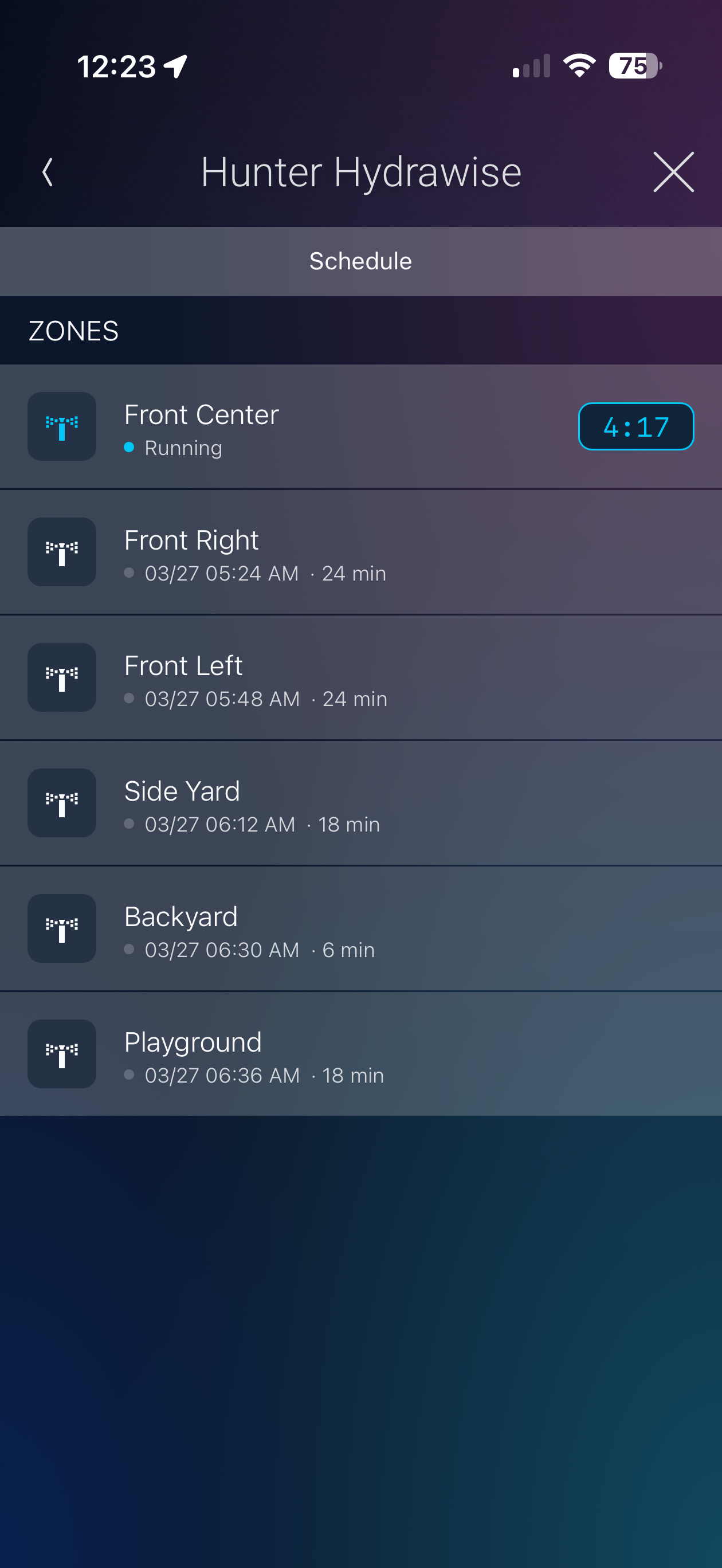
- Experience Button UI - Add the Hunter Hydrawise Experience Button anywhere in Navigator (for example, Comfort) to view upcoming schedules and see which zones are running with time remaining.
Compatible Equipment
- Hunter Hydrawise cloud-connected irrigation controllers associated with a Hydrawise account
v20260325
- Initial release
