



Integrator Tools Experience Bundle - The Ultimate All-in-One Driver for Control4 Projects
This is your complete solution for enhancing both the user experience and installer efficiency in any Control4 project. This powerful collection includes a suite of advanced drivers designed to streamline automation, improve system monitoring, and simplify control—from doors and gates to power, and more.
Whether you're building a new project or upgrading an existing one, this bundle delivers everything you need to create a smarter, more intuitive Control4 system—all in a single, value-packed purchase.
One Bundle. Endless Integration Possibilities.
Included Drivers:



Custom Icon Tool:
Create your own UI button to create the perfect experience for your Control4 clients. Whether it is your clients garage or gate, favorite sports teams or a picture of their fire pit. Turn any scene into a custom experience.
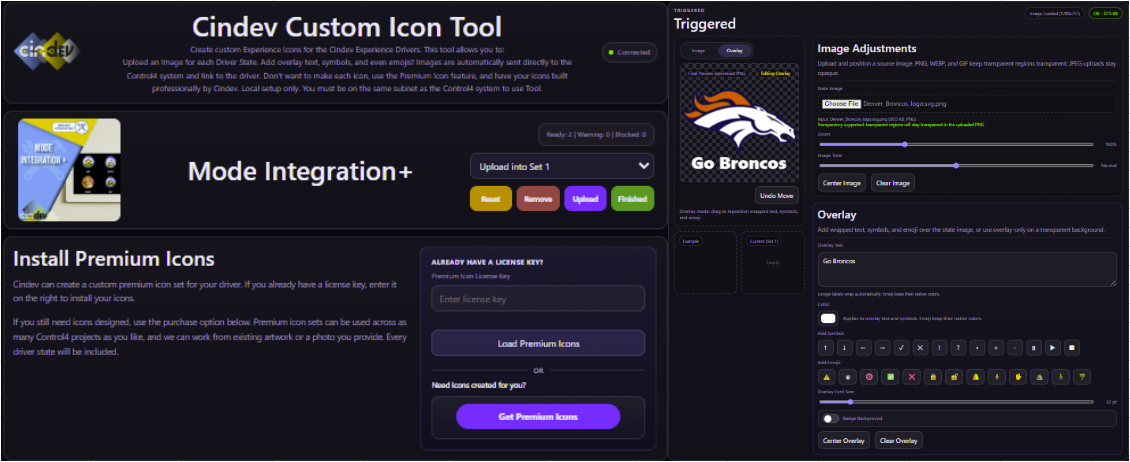
Found under Driver Actions - Load Custom Icons - In the following drivers:
- Garage Integration+
- Gate Integration+
- Power Integration+ (Generic)
- Modes Integration+
- Holiday Integration+
- Lock Integration+
- Doorbell Integration+
- SoundFX Integration+
The Custom Icon Tool will only run on the same local LAN/subnet as the Control4 controller. It is not designed to run from an off-site browser unless that browser has direct local-network access to the controller. Once icons are loaded, they will function remotely on Control4 UIs.
Integrator Tools Agent is required for this tool to function. Click Here to learn more about Integrator Tools

Designed specifically for system 3.4.0 or higher
See individual drivers for more details.

The Integrator Tools Experience Bundle will automatically unlock all Listed Drivers from Cindev. Use a few or use all of them to customize your customer's home and give them true alerts and notifications you'd expect from a high end system. Cloud Driver is required to activate all DriverCentral licenses and trials. To find out more about drivercentral features, click here. Additionally, here is a quick video that demonstrates the licensing process.

All Cindev drivers for Control4 come with a 30-day trial. Simply add the DriverCentral licensing driver along with this driver and you can fully test the driver before purchasing. Including Cinegration Development drivers in your showroom project will give you unlimited use without purchase.
Driver is provided by Cinegration Development LLC. All rights reserved.
No posts found

Integrator Tools Setup - CLICK HERE
Doorbell Integration+ - CLICK HERE
Garage Integration+ - CLICK HERE
Gate Integration+ - CLICK HERE
Lock Integration+ - CLICK HERE
Power Integration+ - CLICK HERE
SoundFX Integration+ - CLICK HERE
Battery Detection+ - CLICK HERE
Climate Detection+ - CLICK HERE
Leak Detection+ - CLICK HERE
Remote Detection+ - CLICK HERE

For a full description of terms and conditions pertaining to Cinegration Development's drivers please visit www.cindev.com/terms-and-conditions
Version History:
Version 20261012
Fixed- Gate Integration+ restores Toggle and Close control with a single momentary relay and Toggle operation without contact sensors. Saved button actions are preserved, and Open Gate remains the default with support for repeated Open requests.
Version 20260817
Added
- Voice and notification audio from Integrator Tools, Doorbell Integration+, and SoundFX Integration+ can now play on selected Bluesound players and Control4 T5 touchscreens, with volume controls where supported.
Improved
- Integration Control now blocks commands, delayed automation, and notifications more consistently while continuing quiet physical-state tracking.
- Gate Integration+ improves one-relay momentary control, Hold-Open validation, repeatable Open pulses, Open-only UI choices, and relay diagnostics.
- Battery Detection+, Settings Integration+, and Integrator Tools dashboards improve session handling and responsive performance on phones and Control4 T4/T5 touchscreens.
Fixed
- Gate and Garage movement control is more reliable, including Stop behavior, one-relay Open-only wiring, and Navigator Hold-Open.
- Settings Integration+ strengthens app-session protection, dealer-approved change controls, and room-list refresh.
- Integrator Tools improves queued voice alerts, voice-catalog handling, and cleanup recovery while keeping Android TV popups opt-in.
- Lock Integration+ recognizes Kwikset Z-Wave keypad users, and Power Integration+ corrects reversed switch feedback.
- Disabled integrations now cancel queued automation and delayed effects instead of running them after disable.
- Battery Detection+ and Remote Detection+ safely ignore stale, deleted, unsupported, or malformed devices.
- Climate Detection+ improves startup and offline handling, alert timing, threshold ordering, live values, and single-setpoint Navigator behavior.
- Climate Detection+ now separates the monitored sensor scale from the project display scale and adds Monitored Input Scale. Dealers who entered display-scale threshold values as a workaround should review them after upgrading; same-scale and humidity configurations should not need changes.
Version 20260716
Added
- Mode Integration+ (Vacation), including Navigator control, scheduled randomized lighting, activation and deactivation macros, an optional Advanced Lighting activation scene, selected-room AV shutdown, keypad links, custom icons, and Integrator Tools events.
- Water Valve Integration+, including relay and reverse-state control, Leak Detection+ automatic shutoff and optional leak-clear restoration, keypad links, custom icons, and Integrator Tools events.
- Android TV Popup notifications in Integrator Tools for TvOverlay, with default TV groups, popup placement/duration settings, test actions, and custom popup commands.
- Slack notifications in Integrator Tools through Incoming Webhooks, with project titles, test actions, notification overrides, and custom message commands.
- Pushover push provider option in Integrator Tools, including setup instructions, app/user key fields, priority mapping, and snapshot attachments when available.
- Dealer-provided credential overrides for Integrator Tools email and voice alerts: custom SendGrid API key/from email and custom Google Text-to-Speech API key.
- Integrator Tools calendar variables and conditionals for day of year, season, active holiday, holiday windows, moon phase, one- and three-day new/full moon windows, zodiac sign, and sunrise/sunset-based time of day, including a Time of Day Changed event.
- Control4 Lux lighting hardware fault monitoring in Integrator Tools.
- Battery Detection+ warning state with distinct events, conditionals, variables, notification templates, and warning-state icons.
- Settings Integration+ Dashboard controls for Scheduler Agent events and dealer-approved room/device renaming.
- Color Integration+ Strobe, Color Chase, Breathe, and Twinkle effects, including synchronized and staggered Breathe, brightness-only effects on compatible Light V2 dimmers, and resumable Paused states for automatic effects.
- Color Integration+ ready-made color themes for faster setup, including seasonal and mood palettes plus Primaries, Forest, and Dark themes.
Improved
- Battery Detection+, Settings Integration+ Dashboard, and Integrator Tools Dashboard now ship their webview apps inside the driver package, replacing the manual Download Latest Dashboard workflow.
- Battery Detection+ Dashboard can edit local configuration, loads faster, and reports when dashboard scans finish.
- Settings Integration+ reduces rendering and animation work for smoother scrolling and selection on Control4 T4 touchscreens.
- Color Integration+ now uses canonical Favorite/Effect mode labels, explicit Manual/Auto Color Cycle behavior, relevant-only Composer properties, automatic setup refresh, and verified `light_v2.c4i` support.
- Color Integration+ pattern tracking now handles delayed device feedback more reliably, separates Auto Off from effect progression, and can optionally ignore manual or third-party light changes.
- Color Integration+ now applies mode-specific names, icons, and click-action defaults, and starts new or reset drivers at Custom Level, 100 percent brightness, and a 1200 ms Strobe interval.
- Color Integration+ documentation now explains Philips Hue and Ketra command buffering plus recommended Light V2 Color On Mode settings for effects.
- Integrator Tools View Agent History output is more compact and focused on the Agent's history.
- Integrator Tools notification defaults use clearer messages and emoji where useful, while Voice Alerts strip emoji before speech.
- Integrator Tools moves Slack and Pushover credentials from Composer entry fields into encrypted driver data, reports safe credential confirmations through the existing Status property, and verifies Slack webhook certificates.
Fixed
- Custom icon choices being reset while refreshing the available icon list.
- Color Integration+ black/off handling, pattern-stop lifecycle, custom-brightness command ordering, and color fade state reconciliation.
- Settings Integration+ UI-button controls now display the driver's current icon immediately after reload without requiring a state change.
- Color Integration+ now updates its driver name and icon when a new Favorite Color or Favorite White Temperature is selected, while ordinary Color Effect palette edits preserve dealer overrides.
- Color Integration+ Strobe now restores brightness before a changed color and avoids repeatedly sending an unchanged color on every lit pulse.
- Color Integration+ double-tap actions now dispatch reliably from Navigator and linked keypad buttons, with focused diagnostics for troubleshooting.
Version 20260610
Added
- Added Cindev Occupancy Integration+ to Official.
- Added Cindev Settings Integration+ to Official.
- Added (Color Integration+) : Additional Lighting integrations (Chowmain Light Group, Blackwire DMX Dimmer).
Improved
- Improved (globally): Improved documentation.
- Improved (Gate, Garage Integration+): Door toggling improved.
- Fixed (Doorbell, SoundFX): Issue where Doorbell/SoundFX had incorrect [OnDriverInit] handling.
- Fixed (Lock Integration+): Issue where auto-lock would start at door open instead of door closed.
Version 20260405
- Climate: first incoming value (after reboot) now does NOT trigger alerts. This prevents initial false alerts after a reboot
- Improved WebUI downloading
- Battery: new UI added
- Added: Custom-Icon support to Mode, Lock, Garage, Gate
- Changed Climate minimum sustain time to 1 minute
- Added better documentation for Garage Contacts/Relays
- Fixed Garage (2 contact) UNKNOWN state to 'PARTIAL'
Version 20260227
- Added Integrator Tools Dashboard
- Added Composer Command: Refresh Navigators
- Added Composer Command: Stop Lights Flash
- Added Custom-Icon support (Gate, Garage, Lock)
- Updated IT documentation for better readability
- Composer Login with Whitelisting no longer logs to History
- Improvements to On-Load with Climate Detection.
- Improved History View
- Clearing an Event Message will now default it back to original/default setting
Version 20260126
- Added Modes Integration+ to the Experience Bundle.
- Added (Refresh List) option to Voice Languages in Integrator Tools.
- Updated Integrator Tools Composer command Flash Lights: minimum flash rate reduced from 3 seconds to 1 second for more programming flexibility.
- Added Climate Detection: Return To Normal event when monitored temperature/humidity returns to the configured safe range.
- Updated Climate Detection messaging: repeated alerts now include how many notices have been sent to the customer.
- Updated Climate Detection sustain logic: when sustain time is enabled, readings must remain in-range for the full sustain period after an alert to trigger Return To Normal.
- Fixed All: history log items now properly decode custom variables.
- Fixed Remote Detection: custom-selected Halo remotes now trigger beeping correctly.
- Improved All: History Report now properly prints from oldest to newest.
Version 20251111
- Added Holiday Integration+ – gives customers an icon on the Control4 UI to turn on or off different holidays.
- Added Color Integration+ (replaces Light Agent) – simplifies programming for color lighting and setting up light patterns.
- Improved icons on all Experience Drivers – icons are now smaller and load roughly twice as fast.
- Added Composer command "Change Custom Icon Set" – allows dealers to change the icon of any Experience Driver during programming.
- Improved "Show Icon in Specific Rooms" – now lists all rooms where the icon is installed, making it easier to hide or show per room.
Version 20251022
- Added Updates to Gate Integration+
- Added Updates to Garage Integration+
Version 20251005
- All: Added Driver Feedback Button
- All: Added DriverCentral Support Ticketing
Version: 20250915
- Added Updates to all Integrator Tools drivers (See Individual Driver Product Pages for specific update details)
Version: 20250528
- Core Update: Improved History Viewer on all experiences
- Added Climate Detection+
- Added SoundFX Integration+
Version: 20250422
- Core updates
- Addition of Doorbell Integration+
Version: 20250411
- Initial Release
