
AI Adaptive Lighting for Control4

Give every Control4 project a premium lighting automation upgrade that is easy to sell, easy to explain, and easy for homeowners to live with. LivingMind Home coordinates lighting around occupancy, daylight, weather, room state, time of day, and sleep/wake behavior, while preserving manual control.

The web-based room policy console lets dealers deliver a polished lighting automation system and give homeowners safe, room-by-room adjustment of everyday lighting preferences without opening Composer for every small change. This creates a stronger proposal, a more personalized handover experience, and a lighting system that continues to fit the homeowner after move-in.

MSRP: $199.00
LivingMind Home
30 days
Platform:
Version: 103
LMH-AI-ADAPTIVE-LIGHTING
Please sign in to buy

This product cannot be added to the
cart because you are not logged in.

Turn standard Control4 lighting projects into adaptive, room-aware lighting experiences—without rebuilding the same automation logic for every room.

AI Adaptive Lighting for Control4 is a third-party residential lighting driver designed to help dealers deliver a more intelligent lighting experience through a repeatable, configuration-driven workflow.

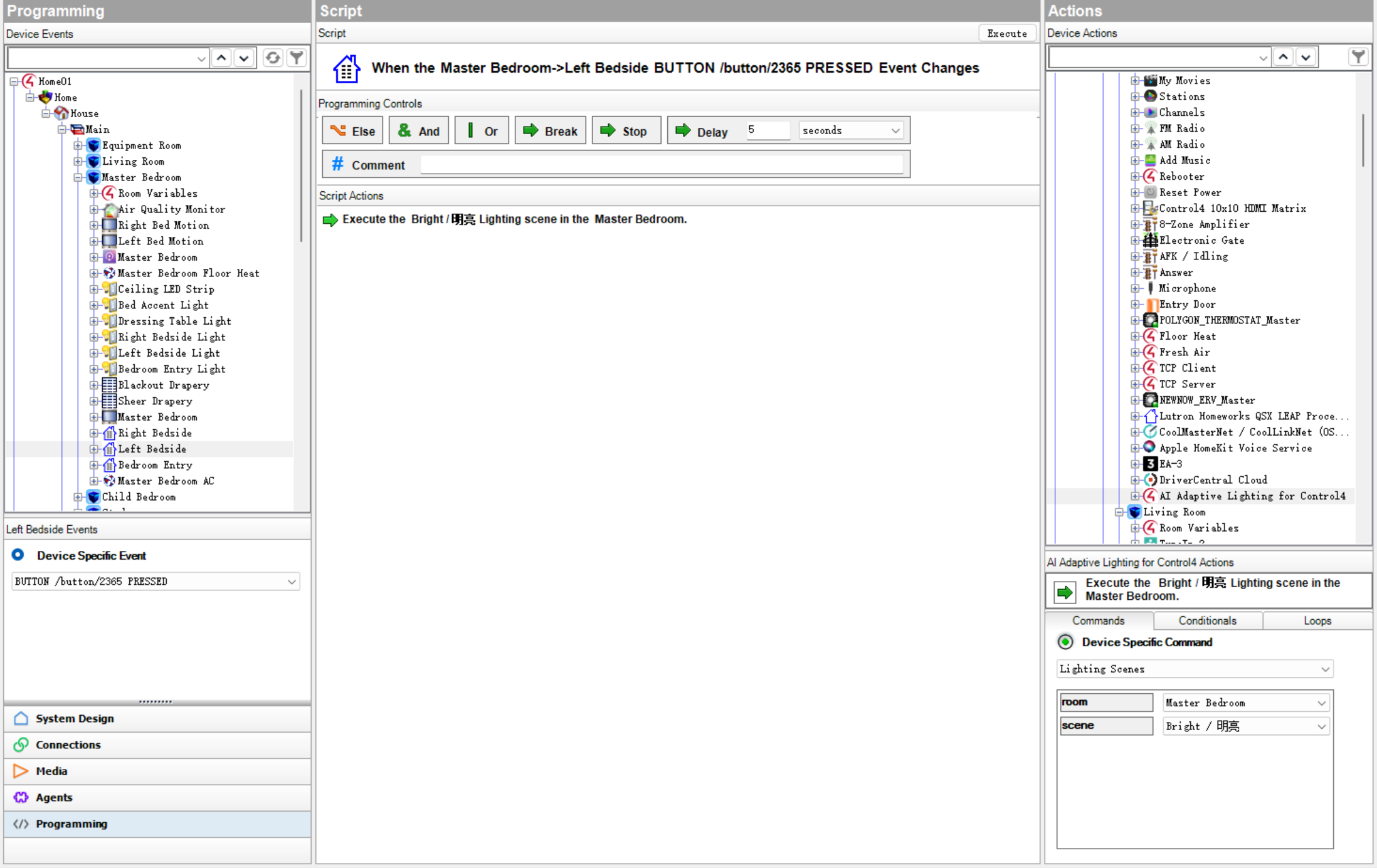
Instead of programming a separate logic tree for every bedroom, bathroom, hallway, kitchen, office, and living area, dealers can map the lighting devices, assign the appropriate motion sensors, choose the intended automation strategy, and assign keypad buttons to supported driver commands where required. For the behaviors supported by the driver, there is no need to recreate large collections of Composer conditionals, timers, variables, and room-specific programming on every project.

The driver adds an AI-assisted, context-aware automation layer on top of Control4. It does more than react to a basic “motion detected → turn lights on” event. Before deciding whether and how a room should respond, it can evaluate multiple factors, including:

Room occupancy and motion-sensor type
Current room and lighting state
Time of day
Natural-light, darkness, and weather context
Room strategy and lighting style
Nighttime lighting preferences
Sleep and wake state where configured
Recent manual interaction and manual override protection
Learned or configured room-level lighting behavior

This allows the same driver to produce different, more appropriate behavior across bedrooms, bathrooms, hallways, living areas, offices, and other residential spaces without requiring the dealer to manually program every possible condition.

For Control4 dealers, the commercial value is straightforward:

Present a more advanced lighting experience in project proposals
Differentiate projects from basic keypad, app, schedule, and motion-sensor control
Reduce repetitive room-by-room Composer programming
Shorten commissioning and testing time
Deliver more consistent behavior across projects
Protect project margin by reducing custom logic and debugging work
Make sophisticated lighting behavior easier to demonstrate to homeowners
Create opportunities for future tuning, upgrades, and professional services

The driver supports adaptive occupancy-based lighting, natural-light-aware behavior, softer nighttime lighting, manual override protection, room-specific strategies, and practical whole-room lighting and media-off scene behavior where supported.

After project completion, supported whole-home defaults and individual room lighting strategies can be adjusted through the LivingMind Home Web Portal. Homeowners can safely fine-tune everyday lighting preferences within the available strategy options, while the dealer retains control of device mapping, system design, commissioning, and the underlying Control4 project.

This gives homeowners a lighting system that can be tuned around actual living habits after installation, while helping dealers avoid repeated Composer visits for small preference changes.

AI Adaptive Lighting for Control4 is intended exclusively for residential convenience and lighting automation. It is not intended for security, life safety, emergency response, fire, smoke, carbon monoxide, gas or water-leak detection, medical or elderly care, access control, door locks, garage doors, automatic heating, shade automation, climate automation, or any safety-critical application.

This is a third-party Control4 driver and is not an official Control4 product.

No posts found

Write a review

Overview

AI Adaptive Lighting for Control4 helps dealers deliver adaptive, room-aware residential lighting without manually rebuilding the same programming logic for every room.

Many Control4 lighting projects still rely primarily on keypads, touchscreens, app control, schedules, and simple motion programming. More advanced room behavior is possible, but it often requires substantial Composer programming, multiple timers and variables, room-specific conditions, ongoing testing, and project-by-project tuning.

AI Adaptive Lighting provides a reusable automation layer for the lighting behaviors it supports. Dealers configure the room structure, lighting devices, sensor assignments, room strategies, and optional keypad commands. The driver then evaluates the current room context and applies the selected strategy at runtime.

The result is a more intelligent homeowner experience with less repetitive programming and more consistent project delivery.

Why Dealers Choose It

The driver is intended to help dealers improve both the homeowner experience and the commercial value of a Control4 lighting proposal.

Stronger project differentiation

The project can be presented as more than a collection of keypads, dimmers, schedules, and app controls. Homeowners receive lighting that responds to occupancy, room context, time, natural light, nighttime preferences, and recent manual interaction.

Less repetitive Composer programming

For supported behaviors, dealers do not need to build a separate conditional logic tree for every room. The workflow is primarily configuration-driven:

  1. Map lights to the correct rooms.
  2. Assign and classify motion sensors.
  3. Select the desired room strategy.
  4. Configure supported defaults and room preferences.
  5. Assign keypad buttons to driver commands where explicit control is required.
  6. Test and commission the behavior.

More consistent delivery

A repeatable driver-based approach helps reduce differences between projects and between individual programmers. Dealers can apply a common automation framework while still tuning each room for the homeowner.

Better margin protection

Reducing repetitive programming, testing, and debugging helps protect project margin. The dealer can spend more time on system design, commissioning, homeowner presentation, and professional tuning rather than rebuilding the same automation logic.

Better long-term service opportunity

The Web Portal allows supported preferences to be adjusted after installation without exposing the underlying Control4 programming. Dealers retain control of the project while gaining a clearer path for future tuning, upgrades, and professional services.

How the AI-Assisted Decision Layer Works

AI Adaptive Lighting is not simply a fixed “motion on, lights on” driver.

The driver builds a room-level operating context from the Control4 project and the selected room strategy. Depending on the available configuration, this context may include:

  • Room identity and room type
  • Lighting devices assigned to the room
  • Normal, force-light, and nighttime motion-sensor assignments
  • Current room occupancy
  • Current light state and brightness
  • Time of day
  • Natural-light and darkness conditions
  • Weather-related lighting context
  • Sleep and wake state where configured
  • Recent manual lighting interaction
  • Manual override and protection state
  • Whole-home defaults
  • Room-level Web Portal strategy
  • Learned or configured room lighting targets

The driver uses this context to decide whether the room should respond, which lights should be used, and what brightness behavior is appropriate.

The dealer still defines the project structure and automation boundaries. The driver applies those boundaries consistently at runtime instead of requiring every possible condition to be manually represented as Composer logic.

Core Capabilities

Adaptive occupancy-based lighting

Lighting behavior can respond to room occupancy while considering the room strategy, sensor type, current light state, and environmental context.

Natural-light and darkness awareness

Motion lighting can respond differently during bright daytime conditions, darker or cloudy conditions, dusk transitions, and nighttime periods.

Multiple motion-sensor roles

Supported sensor assignments include normal motion, force-light motion, and nighttime motion. Each role can support different behavior while sharing the same room-level automation framework.

Room-specific lighting behavior

Bedrooms, bathrooms, hallways, living areas, kitchens, offices, and other room types can use different strategies without requiring a completely separate Composer program for each room.

Nighttime lighting

Supported rooms can use softer and more appropriate late-night lighting behavior instead of always returning to normal daytime brightness.

Manual override protection

Recent homeowner interaction is respected so that automatic lighting does not immediately fight a deliberate manual command.

Sleep and wake integration

Where configured, sleep and wake states can influence supported lighting behavior and room-level scene actions.

Learned and configured lighting targets

The driver can use learned or configured room lighting behavior to produce more appropriate brightness targets for individual fixtures.

Whole-room scene behavior

Supported commands can provide practical room-level behaviors such as turning off room lights and supported active media together.

Homeowner Web Portal

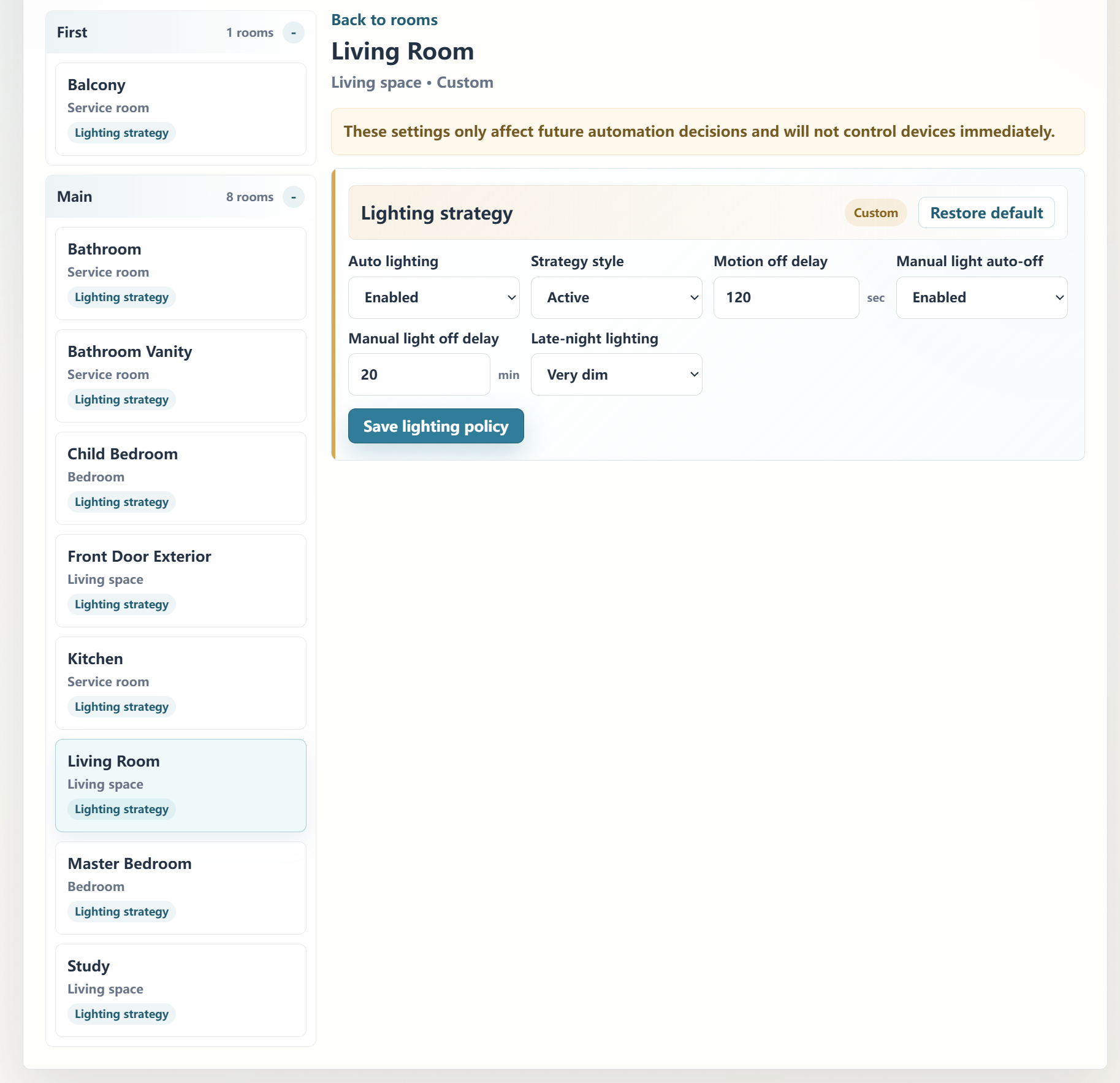
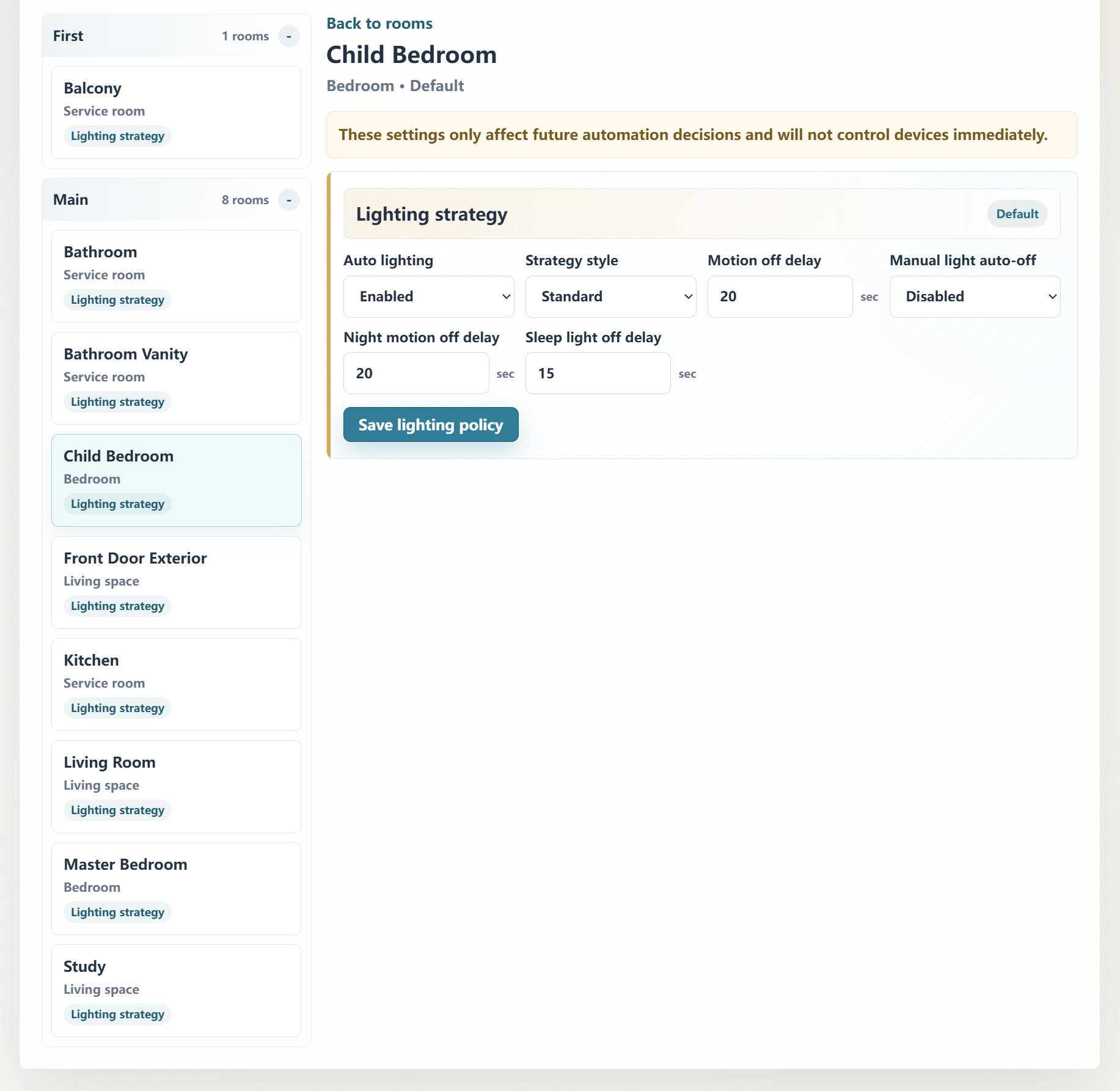
Supported defaults and room strategies can be adjusted through a web interface after the project is bound.

Homeowner Web Portal

The LivingMind Home Web Portal is an important part of the product.

After project binding, the portal can expose supported whole-home defaults and individual room lighting strategies. Homeowners can adjust everyday lighting preferences without editing the Control4 project or rebuilding Composer programming.

Depending on the active product configuration, supported options may include:

  • Automatic lighting enable or disable
  • Room lighting strategy
  • Occupancy-triggered lighting timing
  • Nighttime lighting preferences
  • Supported room-level lighting behavior
  • Whole-home defaults and room overrides

The dealer continues to control:

  • Device installation and mapping
  • Room structure
  • Sensor assignment
  • Keypad programming
  • System design
  • Core commissioning
  • Supported policy boundaries

This balance allows homeowners to safely tune daily preferences while protecting the integrity of the installed Control4 system.

Dealer Workflow

A typical project workflow is:

  1. Install the driver in Composer Pro.
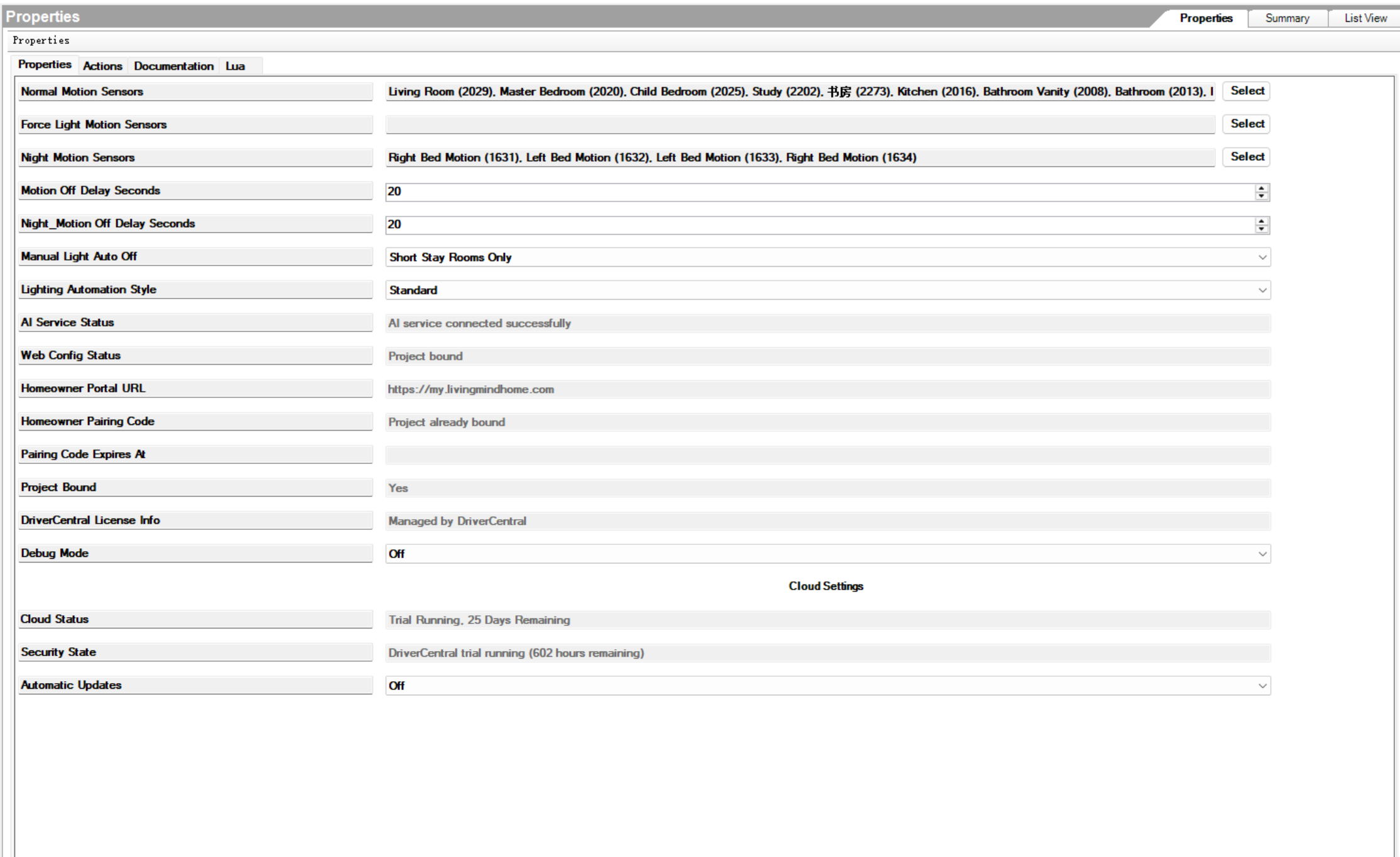
  2. Confirm the DriverCentral license or trial status.
  3. Confirm that lighting devices are assigned to the correct rooms.
  4. Assign normal, force-light, and nighttime motion sensors as required.
  5. Review the available lighting automation styles and properties.
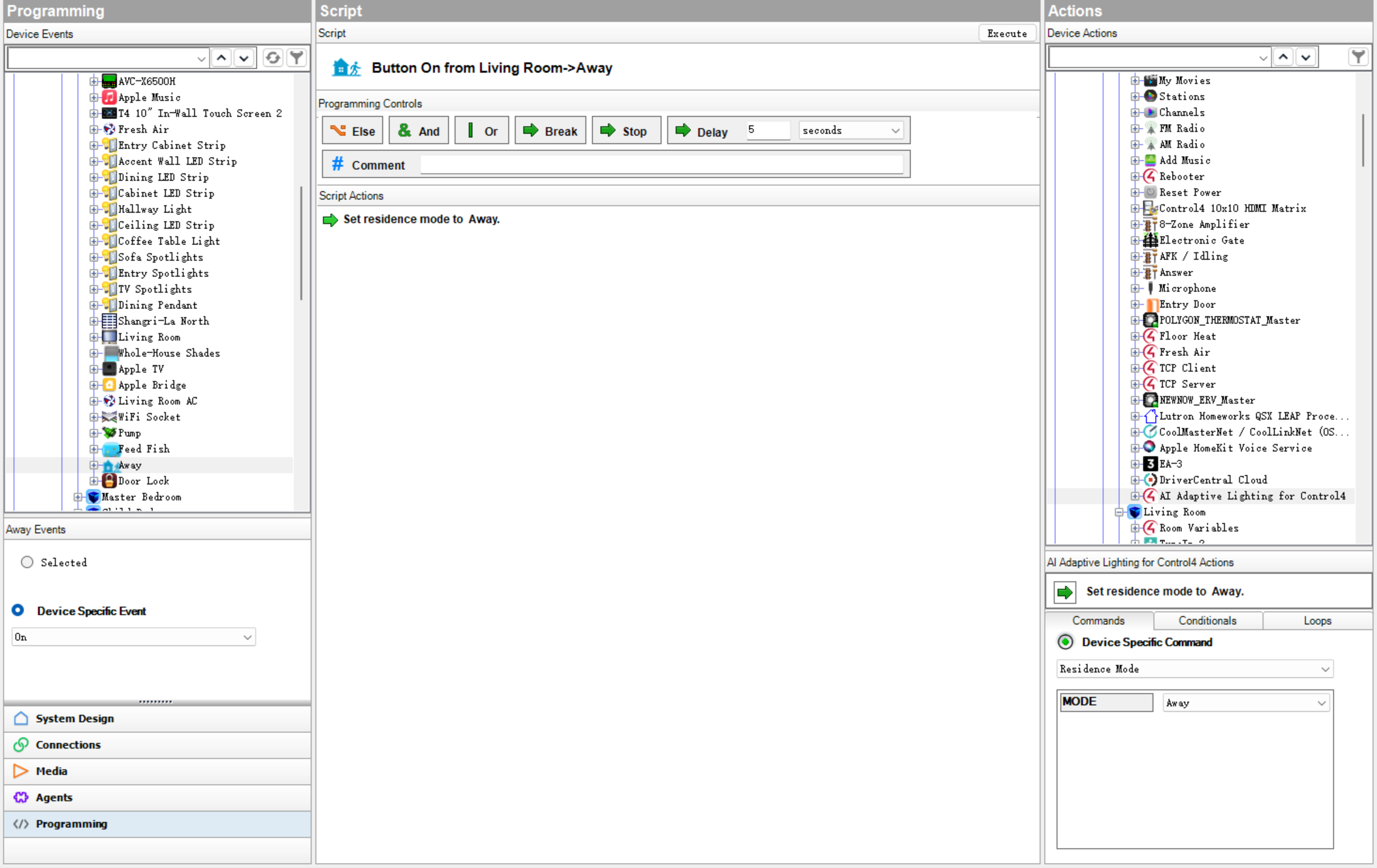
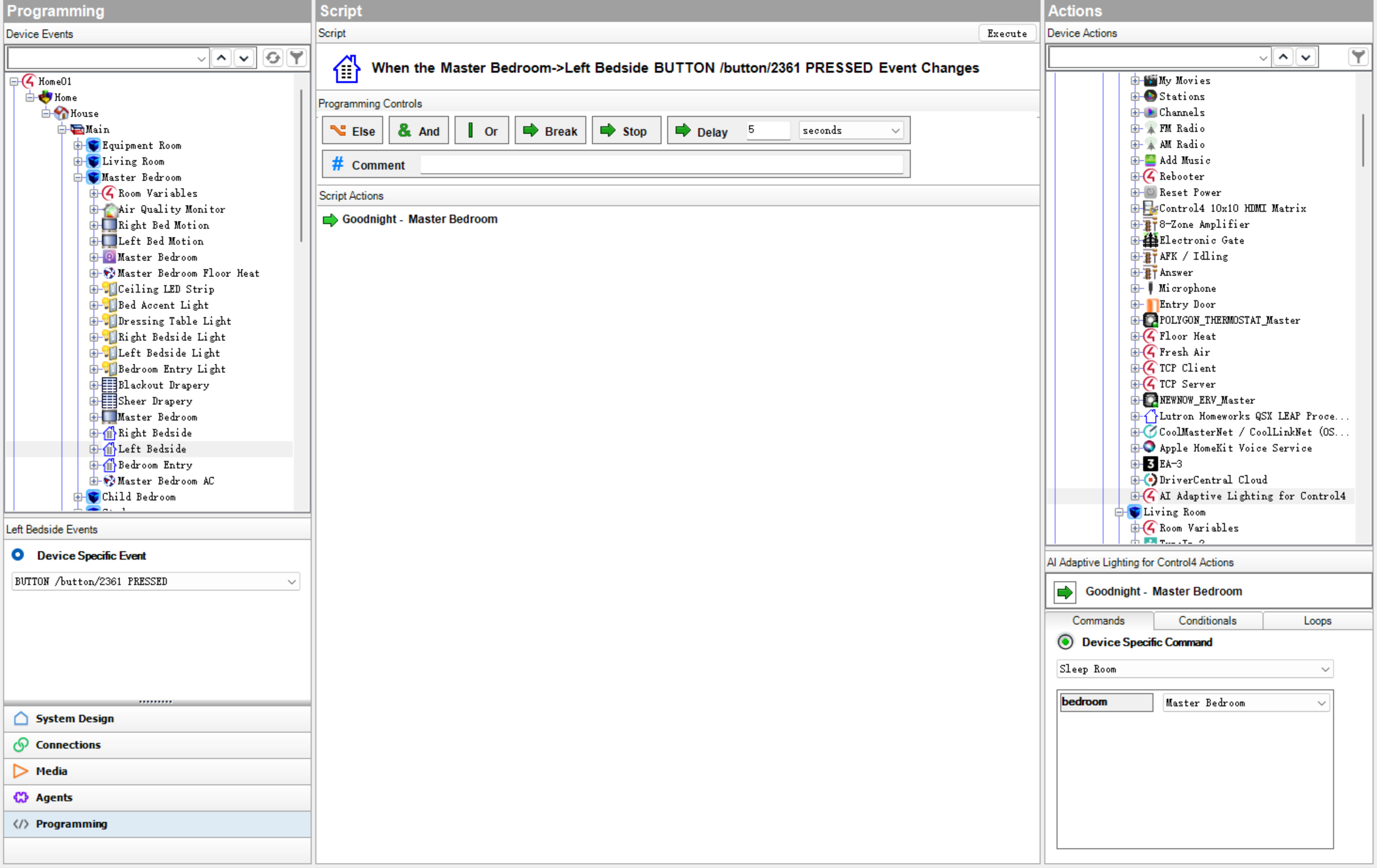
  6. Assign keypad buttons to supported driver commands where explicit control is needed.
  7. Bind the project to the Homeowner Web Portal when room-level web configuration is required.
  8. Configure whole-home defaults.
  9. Configure room-level lighting strategies.
  10. Test representative bedrooms, bathrooms, hallways, living areas, kitchens, and other key spaces.
  11. Verify manual override protection.
  12. Verify nighttime and sleep/wake behavior where configured.
  13. Demonstrate the homeowner-adjustable strategy options before final delivery.

Basic Setup

1. Install the driver

Add the driver to the Control4 project using Composer Pro.

2. Confirm licensing

Verify that the DriverCentral license or trial is active.

3. Review room and device assignments

Confirm that lights and sensors are assigned to the correct Control4 rooms. Correct room membership is important for room-level behavior.

4. Assign motion sensors

Assign sensors to the appropriate driver properties:

  • Normal Motion Sensors
  • Force Light Motion Sensors
  • Night Motion Sensors

The selected role determines how the sensor participates in room lighting decisions.

5. Review the motion off delay

Configure the supported motion off delay according to the room type and expected occupancy pattern.

Shorter delays may be appropriate for transitional areas. Longer delays may be more appropriate for living rooms, offices, and spaces where occupants may remain relatively still.

6. Review lighting automation style

Choose a strategy that matches the intended homeowner experience. More active strategies can respond more readily, while more conservative strategies can reduce unnecessary automation.

7. Configure keypad commands

Where explicit homeowner control is needed, assign keypad buttons to the appropriate driver command instead of rebuilding the underlying automation logic with custom conditions.

8. Bind the Web Portal

Bind the project to the LivingMind Home Web Portal when homeowner-adjustable whole-home defaults and room-by-room strategies are required.

9. Test before delivery

Test each important room under realistic conditions:

  • Normal daytime use
  • Darker or cloudy conditions
  • Dusk
  • Late-night use
  • Manual lighting changes
  • Motion entry and release
  • Automatic lights-off behavior
  • Sleep and wake behavior where configured
  • Web Portal strategy changes

Naming Recommendations

Clear room and fixture naming improves automatic classification and makes commissioning easier.

Recommended room-name examples:

  • Master Bedroom
  • Guest Bedroom
  • Bathroom
  • Kitchen
  • Dining Room
  • Living Room
  • Media Room
  • Hallway
  • Office
  • Study

Recommended fixture-name examples:

  • Wall Light
  • Ceiling Light
  • Cabinet Light
  • Corridor Light
  • Dining Pendant
  • Table Light
  • LED Strip
  • Spotlights
  • Vanity Light

Supported English or Chinese naming is recommended for the best automatic room and fixture classification.

Other languages may still work for basic device control, but advanced automatic classification may require additional verification.

Commissioning Recommendations

Before final delivery:

  • Confirm that every light belongs to the correct room.
  • Confirm that each sensor is assigned to the correct sensor role.
  • Verify that automatic lighting does not conflict with deliberate manual control.
  • Verify that room-level brightness targets are appropriate.
  • Test multi-light rooms carefully.
  • Test motion entry immediately after automatic lights-off.
  • Test manual All Off behavior.
  • Test nighttime behavior.
  • Test Web Portal inheritance and room overrides.
  • Confirm that unsupported devices are not included in automatic actions.

Important Limitations

AI Adaptive Lighting for Control4 is intended for residential comfort, convenience, and lighting automation.

It is not intended for:

  • Security or alarm functions
  • Fire, smoke, or carbon-monoxide response
  • Gas or water-leak response
  • Medical or elderly-care monitoring
  • Emergency response
  • Door locks
  • Garage doors
  • Access control
  • Automatic heating
  • Shade automation
  • Climate automation
  • Any life-safety or safety-critical application

Professional Control4 system design, device selection, installation, commissioning, and testing remain the responsibility of the dealer.

This is a third-party Control4 driver and is not an official Control4 product.

Version 103

Major Homeowner Web Portal and room lighting strategy update.

Added Homeowner Web Portal support.
Added project binding and Web policy synchronization.
Added lighting defaults and room-by-room lighting strategy configuration.
Added Web-based default inheritance handling for room lighting strategies.
Added Driver runtime support for Web resolved room lighting policies.
Added practical lights-off plus media-off scene behavior for room-level lifestyle scenes.
Improved natural-light based timing for motion-triggered lighting, so lights turn on more appropriately around dusk and low-light conditions.
Updated Composer fallback behavior when Web Portal is not bound or unavailable.
Improved Sleep Room and Wake Room lighting behavior.
Reduced normal diagnostic log output when Debug Mode is Off.
Updated DriverCentral documentation for Web Portal and room lighting strategy behavior.