
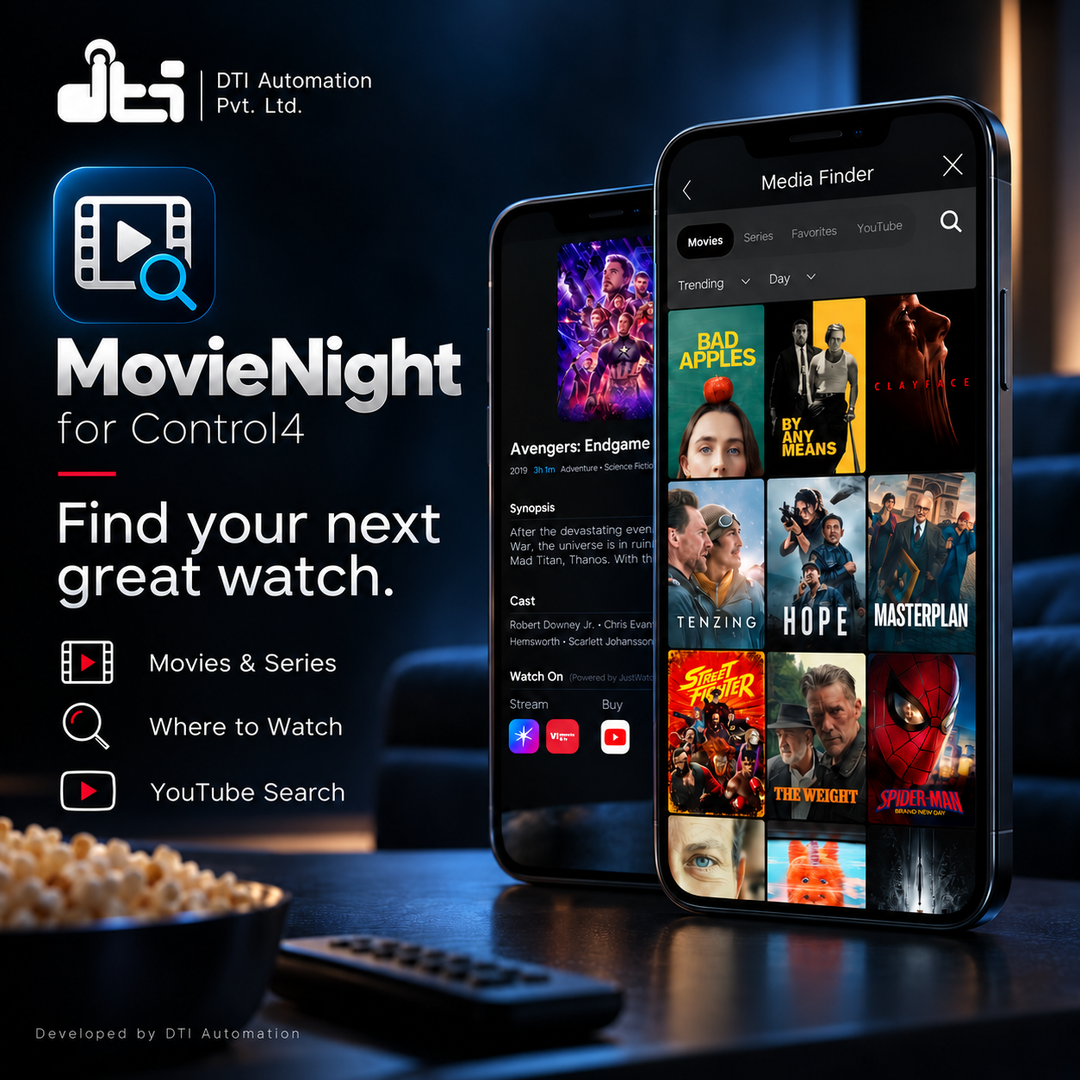
A movie and TV screen for Control4: find something to watch, see the trailer, see where it streams, and open it with one tap in that service's app on the room's Apple TV or Google TV.
Movie Night puts a Movie Night button in the room's menus on Control4 touchscreens and in the Control4 app on phones and tablets. Behind it, the household browses films and series, watches trailers, sees which streaming services carry each title in their country, keeps favourites, and taps a service to open the title in that app on the television. One screen to choose from, instead of opening app after app to look.
Movie Night works through DTI Automation's own Apple TV and Google TV drivers, which already control the streaming device in the room. Add Movie Night beside that driver, point it at the device, paste three API keys and show the button.
Key Features
- A movie and TV catalogue on the touchscreen. Movies, Series and Favorites, with genres, search, Popular, Top Rated and Upcoming lists, posters and title details.
- See where it streams. Under Watch On, each title shows the streaming services that carry it in the home's country.
- One tap to the title. Tap a service under Watch On and Movie Night opens the title itself in that service's app on the room's Apple TV or Google TV. When no link to that title can be found, it usually opens the service's app at its home screen instead, and Last Error says so.
- Series by season and episode. A series lists its seasons and episodes, and an episode row marked with a play triangle opens that episode directly in the service's app.
- Trailers on the television. Where TMDB has a trailer for a title, Watch Trailer opens it in the YouTube app on the room's streaming device.
- YouTube on the touchscreen. The YouTube tab searches YouTube and opens the video you tap in the YouTube app on the television.
- A remote on the screen. Arrows, select, home, back and volume, all sent to the room's Apple TV or Google TV. On touchscreens and tablets, most titles' details also carry play, pause, rewind and forward.
- Starts with the household's own services. Movie Night reads the apps installed on the streaming device and starts the screen with the household's streaming services already selected. The screen's settings gear changes the country, the language and the services selected.
- Follows the home's country. With Region on Automatic, Movie Night uses the controller's own location. Or pick the country: from 139 in Composer's Region list, or on the screen's settings gear. The catalogue and the Watch On tiles follow the country in force.
- Favourites. Tap the heart on a title to keep it under Favorites on that screen.
- The screen keeps itself up to date. Improvements to the Movie Night screen reach the home over the internet by themselves, with no new driver to install and nothing to set in Composer. If an update cannot be fetched or checked, the screen the home already has keeps opening as before.
- One for each streaming device. Each Movie Night serves one Apple TV or Google TV. A second streaming device gets its own Movie Night, with its own button in its room.
- Programmable. The Select Streaming Device command lets Composer programming point Movie Night at a different Apple TV or Google TV.
- Tells you what it is doing. Streaming Device Status names the device, its model and its room. Installed Apps and Streaming Selection show what was read from the device and which services the screen starts with. Last Message and a plain-English Last Error say what happened and what to do. None of them needs logging.
Supported Devices
- Apple TV: any Apple TV the DTI Automation Apple TV driver pairs with and controls
- Google TV and Android TV streaming players and televisions that one of the three DTI Automation Google TV drivers (Satellite, TV or Media Player) pairs with and controls
- Control4 touchscreens and the Control4 app on phones and tablets, version 321.46 or later
Movie Night sends every remote button, trailer, video and provider tile through the DTI Automation driver for the room's streaming device, and those drivers are sold separately on DriverCentral. Another maker's Apple TV driver, or an infrared driver, is not accepted as the streaming device.
Requirements
- Control4 OS — 4.0.0 or later (X4). The DTI Automation Apple TV and Google TV drivers that Movie Night works through need OS 4.0.0.
- The DTI Automation Apple TV or Google TV driver in the room, paired, licensed and working. On a Google TV or Android TV device, reading the installed apps also needs network debugging switched on in the device's developer options, and that driver's connection allowed on the television when it asks.
- Internet access, for the screens and the controller. Touchscreens, phones and tablets fetch the catalogue and posters themselves, so a screen with no route to the internet shows no titles. The controller needs outbound secure web access (HTTPS) for provider tiles, YouTube search and screen updates.
- The DriverCentral Cloud driver in the project, registered to your drivercentral.io account.
- Three API keys, from three outside services. None is built into the driver, and none is a Movie Night licence. The Documentation tab walks through getting each one, with links.
- TMDB (The Movie Database), on your company's account. Required: it supplies the whole catalogue, from titles and posters to trailers and the Watch On tiles. TMDB's free key is for non-commercial use, and TMDB's terms count charging for a product that uses TMDB as commercial use. Before relying on a free key for a paid install, ask TMDB about a commercial licence through its business licensing page.
- Movie of the Night, on your company's account. It lets a tap on a service open the title itself rather than the app's home screen. Its free plan is 1,000 requests a month for the whole account, shared by every home that uses the key; more needs one of its paid monthly plans. Movie Night asks once per title per country when a tile is tapped, and once more when a series' episodes are listed, and remembers recent answers for up to six hours. Movie of the Night covers 65 countries; elsewhere the tiles still show where a title streams, and a tap usually opens the service's app at its home screen.
- YouTube Data API, in a Google Cloud project made for each home in the homeowner's own Google account, set up by the homeowner or with them: one project and one key per home. Only the YouTube tab's search uses it, and trailers work without it. It is free, needs no billing account, and gives each home about 100 searches a day.
Setup
- Install, pair and test the DTI Automation Apple TV or Google TV driver in the room, and add the DriverCentral Cloud driver to the project.
- Get the three API keys: TMDB and Movie of the Night on your company's accounts, and YouTube with the homeowner, in a Google Cloud project in their own Google account. The Documentation tab has the steps, with links.
- Add Movie Night to the room the streaming device is in. Keep the driver file's name as downloaded: a renamed file opens a blank screen.
- In Properties → Streaming Device, pick the Apple TV or Google TV. Streaming Device Status confirms its model, name and room.
- Paste the keys into TMDB API Key, YouTube API Key and MON API Key (the Movie of the Night key). Leave Region on Automatic, or pick the country.
- In the room's Navigator properties, set Movie Night Visible in a menu, usually Watch, then Refresh Navigators.
- Open Movie Night on a touchscreen. The Movies grid fills with posters.
Full dealer documentation — step-by-step instructions for each API key, every property, action and programming command, and troubleshooting keyed to the exact Last Error text — ships inside the driver on its own Documentation tab in Composer.
Licensing
Sold and licensed through DriverCentral, with a free showroom licence for dealers and automatic updates (Automatic Updates in Cloud Settings, Off by default).
A new install starts a 30-day DriverCentral trial by itself, and the trial runs the driver in full. Cloud Status, at the top of the Properties tab, shows the days left.
Without a valid licence, the screen still opens and shows the catalogue, and the driver's own settings, such as Streaming Device and Region, still answer, as do the Show Target Info action and favourites, so you can set the driver up and diagnose it. The provider tiles, the remote and transport buttons, trailers and YouTube videos, episode rows, YouTube search, the screen's country and streaming-app pickers and Refresh Installed Apps are refused, picking the household's services from the installed apps waits for the licence, and Last Error names what was refused. A licence assigned or renewed on drivercentral.io takes effect within seconds — no driver reload, no controller restart.
The three API keys are separate from the licence: each belongs to the account that created it.
Support
Technical support is available through https://help.drivercentral.io.
Before raising a ticket, have the Driver Version, Cloud Status, Streaming Device Status, Last Message and Last Error values, your controller model and OS version, and the streaming device with the version of its DTI Automation driver. Those answer most of the first round of questions.
Driver by DTI Automation Pvt. Ltd. This product uses TMDB and the TMDB APIs but is not endorsed, certified, or otherwise approved by TMDB. Streaming availability information is provided by the Streaming Availability API by Movie of the Night. YouTube, Google Cloud, Google TV and Android TV are trademarks of Google LLC. Apple TV is a trademark of Apple Inc. Movie Night is not made by, endorsed by or affiliated with TMDB, Movie of the Night, Google LLC or Apple Inc.
No posts found
Driver documentation ships inside the driver itself on its own Documentation tab in Composer.
- Ver:1058
Requires Control4 OS 4.0.0 or later. Licensing: DriverCentral or DTI activation (either is enough); a new install starts a 30-day trial.
WHAT IS NEW
- The screen sets itself up the first time the driver loads, and again after a driver update. It takes about two minutes and needs internet access.
- Choosing the Streaming Device puts the Movie Night button in the room's Watch menu. New action: Show in Watch Menu. Refresh Navigators afterwards.
- One driver file carries both DriverCentral licensing and DTI activation. Set Activation Method to the one you bought.
- A short dealer manual (PDF) is supplied, and the Documentation tab in Composer has the setup guide.
- Bigger Watch On icons with a play badge.
- Clearer Last Message and Last Error sentences, and a steadier first start.
BEFORE YOU UPDATE
- Control4 OS 4.0.0 or later is required. On an older OS the driver shows DRIVER DISABLED in Driver Version; update the controller first, or keep the earlier Movie Night driver on it.
- After an update the screen prepares itself again. The controller needs internet access and a valid licence or trial.
- Check that Driver Version changed after the update.
- If a Streaming Device was already chosen, run Show in Watch Menu once. - Ver:1050 First release. A movie and TV screen for Control4 touchscreens and the Control4 app: browse films and series, watch trailers, see which streaming services carry each title in your country, and tap a service to open the title in its app on the room's Apple TV or Google TV, through DTI Automation's Apple TV and Google TV drivers. Also YouTube search, seasons and episodes, favourites, an on-screen remote, and a screen that keeps itself up to date. Licensed through DriverCentral, with a 30-day trial.
