


The Best WLED Driver in the Market.
Native WLED control for Control4.
The DTI Automation WLED driver brings a WLED LED controller into Control4 as a real light: on, off, dimming, colour and colour temperature from the Control4 app, keypads, scenes and programming. An Extras tab adds everything WLED has beyond a plain light — effects, palettes, presets, playlists, segments, the nightlight and sync. The driver talks to the controller directly over the local network. There is no helper application to host and no always-on box.
One driver controls one WLED controller, and the whole strip appears in Control4 as one light. Add one driver for each controller.
Key Features
- A real Control4 light. On, off, toggle and dimming with ramp rates from the app, keypads and programming. Colour on RGB and RGBW strips, and colour temperature on strips with warm and cool white LEDs.
- Scenes and On Modes. The light takes part in Advanced Lighting Scenes and follows the brightness and colour On Modes set for it in Composer, like any Control4 light.
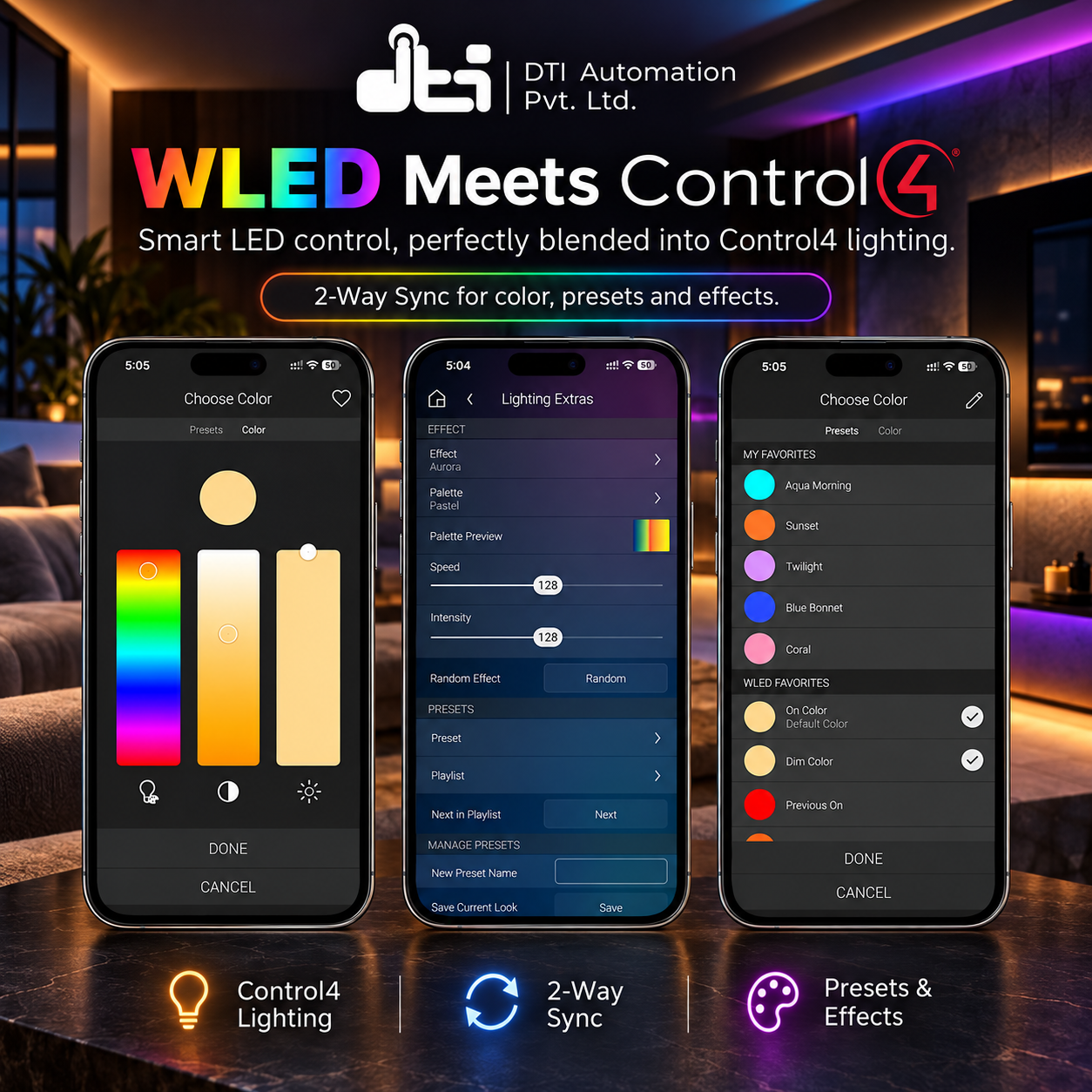
- Every effect, one tap away. The Extras tab lists the controller’s own effects — Solid first, then A to Z — with a palette picker, a palette preview strip, speed, intensity and the extra sliders and switches an effect has, each under the name the WLED app gives it, plus a Random Effect button.
- Presets and playlists. Apply any preset saved on the controller, start a playlist and move on to the next item in it.
- Save and delete presets from Control4. Type a name and save what the light shows now as a new WLED preset, or delete a preset or playlist you no longer want. An existing preset is never overwritten.
- WLED presets in the colour picker. Every preset saved on the controller appears in the light’s colour picker under its own name. Tap it to apply the preset.
- Segments. Aim the effect controls at all segments or at one, and set a segment’s power and brightness on its own.
- Nightlight and sync. Start or stop WLED’s nightlight with its duration, mode (Instant, Fade, Colour fade or Sunrise) and target brightness, and turn Send Sync on or off to pass changes on to the other WLED controllers set to receive them.
- Programming for the whole lot. Fourteen commands — presets, playlists, effects, palettes, speed, intensity, random effect, the nightlight, sync and segment power — with presets and effects picked by name or by number. Seven variables and six events (preset, effect, playlist, connected and disconnected) say what is running.
- Changes from anywhere show up. A change made in the WLED app, with a button on the controller or by anything else reaches Control4 by itself, usually within about a second, and the light, the Extras tab and the variables follow it.
- Finds the controller for you. One action lists the WLED controllers on the network with their names and addresses; pick one and its address fills in. If the controller later comes back on a new address, the driver finds it again by its hardware address and carries on.
- Warm and cool white you can tune. Set the colour temperature of the strip’s warm and cool white LEDs, so the range the Control4 app offers matches the strip.
- Tells you what it is doing. Connection Status, whether updates are live, the controller’s name, WLED version, hardware address, LED count and what the strip can show, Driver Version, and a plain-English Last Error on the Properties tab whenever something does not work.
Supported Devices
- WLED controllers (ESP32 and ESP8266) running WLED 0.14 or later
- RGB, RGBW and white strips, including strips with warm and cool white LEDs
The driver reads what the controller reports — its name, WLED version, LED count and whether the strip has colour, white and colour temperature — and shows it on the Properties tab, so you can see exactly which controller a driver is attached to without leaving Composer.
Requirements
- Control4 OS — 3.3.2 or later.
- Network. The Control4 controller must reach the WLED controller over the local network. For automatic discovery, the two must be on the same network — discovery is commonly not carried between VLANs or onto a guest network. If they are separated, type the address in by hand. A DHCP reservation is tidy but is not required.
- Internet access on the Control4 controller for licence activation. The lighting control itself stays on the local network.
Setup
- Add the driver to the project, in the room where the strip is.
- Type the controller’s address in IP Address, or run Actions → Discover WLED Devices and pick the controller in Properties → Discovered Devices. The address fills in.
- Connection Status reads Online, and the controller’s name, WLED version, hardware address, LED count and light capabilities fill in. The effect, palette, preset and playlist lists load at the same time.
- Set the light’s ramp rates and On Modes on its Lighting settings in Composer, as for any Control4 light.
Full dealer documentation — every property, action, Extras control, programming command, variable and event — ships inside the driver on its own Documentation tab in Composer, and as a PDF in the download.
Licensing
Sold and licensed through DriverCentral, with a free showroom licence for dealers and optional automatic updates.
The driver does nothing without a valid licence. Until it is licensed, the light keeps reporting its state but every command and action is refused, and Last Error says why. Assigning or renewing a licence on drivercentral.io takes effect with no driver reload.
This driver can be licensed through DriverCentral or directly through DTI Automation, and a valid licence from either works. Set Activation Method at the top of the Properties tab to match where you bought it, and only that licence’s fields are shown. A new install runs a 30-day trial: Cloud Status shows DriverCentral’s, and Activation Status shows DTI’s.
Support
Technical support is available through https://help.drivercentral.io.
Before raising a ticket, have the Driver Version, Connection Status and Last Error values, the Firmware Version the WLED controller reports, and your Control4 controller model and OS version. Those answer most of the first round of questions.
Driver by DTI Automation Pvt. Ltd. WLED is an open-source project; this driver is not made by, endorsed by or affiliated with it.
Driver documentation is included in the Download Driver zip file, and ships inside the driver itself on its own Documentation tab in Composer.
- Ver:1005 First release. A Control4 light with colour and colour temperature, an Extras tab with effects, palettes, presets, playlists, segments, the nightlight and sync, WLED presets in the colour picker, programming commands, variables and events, and live feedback — licensed through DriverCentral or DTI Automation.
