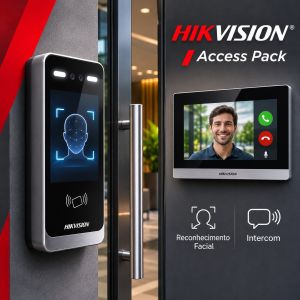


Hikvision face recognition terminals and SIP video door stations working together in Control4: access events, door control, video intercom, notifications and an access history screen. One license covers the whole pack.
The 4Drivers Hikvision Pack brings Hikvision access control and video intercom into Control4 with one license and one setup. The pack has four drivers that work together:
4Drivers DC Hikvision Server: receives the events sent by the Hikvision devices and delivers each one to the right driver. It also carries the license for the whole pack. One Server serves every face reader and door station in the project.
4Drivers DC Hikvision Face Recognition Reader: integrates Hikvision face recognition and access control terminals.
4Drivers Hikvision Face Recognition UI: an "Access Control" screen on Control4 touch screens and the app.
4Drivers Hikvision Intercom: turns Hikvision SIP video door stations into Control4 door stations.
Face Recognition Reader
One event per registered user ("User X is identified"), plus events for any identified user, unauthorized user, unrecognized person, doorbell and push button.
Import Users creates the user events automatically. New users are added as they are identified.
Control of the two reader relays, and contact sensor and relay status for lock drivers.
Automatic messages for valid users, unauthorized users and unrecognized people, by e-mail or through 4Drivers Message Sender (WhatsApp, Telegram, Facebook).
Variables with the last valid user and the last denied user, for push and e-mail through Control4.
Configures the reader automatically when the IP is entered, and shows the reader status and the time of the last event received.
Repeat protection settings to avoid multiple triggers for the same person.
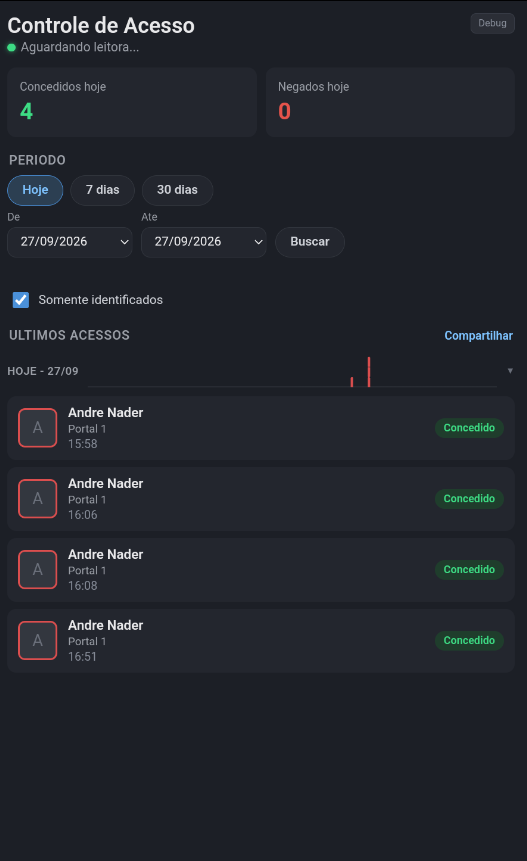
Access Control screen (UI)
Granted and denied accesses for today, at a glance.
History grouped by day, with an hourly chart for each day.
Filters: Today, 7 days, 30 days or a custom date range, plus an "Only identified" filter.
Share the history through WhatsApp, e-mail and other apps.
Portuguese, English or Spanish.
Added to the project automatically with the Reader, already connected.
Video Intercom
The door station call button rings the Control4 touch screens and app users of the chosen intercom group, with two-way audio and video.
Configures the device by itself: one action writes the SIP account, the call button and the call destination. No setup on the device web page is needed.
Door release during the call with custom buttons, and also from programming or the user interface.
Door modes: release, close, hold open and hold closed.
Call events: ringing, answered, ended and call button.
Access events (card or user granted or denied, visitor access) with variables for the user, ID and card.
Door events: lock released and engaged, door sensor, door forced open, door left open, exit button and remote release.
Motion detection and alarm inputs in real time, through the Server.
Notifications by Control4 push with a photo from the door station camera, by e-mail, and through 4Drivers Message Sender with a photo link.
Device volume (talk, prompts and microphone) from Composer or programming.
Door station camera available in Navigator.
On-screen PIN entry by tapping the camera image, including to open the door.
Automatic SIP recovery if the device loses its registration.
Licensing
One DriverCentral license per project, applied to the Hikvision Server. It enables the Face Recognition Reader, the Access Control screen and the Intercom. The Reader and the Server are the same DriverCentral product, and the UI and Intercom drivers have no separate license. All four drivers are on the same version.
Requirements
Control4 controller with Composer Pro.
Hikvision face recognition or access control terminal with ISAPI, and/or a Hikvision SIP video door station with standard SIP.
Fixed IP addresses for the devices, on the same network as the controller.
Administrator user and password of each device.
For the intercom: the Communication agent and an intercom group in the project.
For push notifications: the Push Notification agent (4Sight).
Users are registered directly on the Hikvision terminal or its management platform.