

Control4 light and sound control from one driver. Each instance includes a Hatch Navigator WebView button and a Hatch Light light driver.
Before You Start
- Control4 OS 3.3.0 or later and Composer Pro.
- A Navigator with WebView support.
- A Hatch account with an email and password.
- A cloud-connected Hatch device and controller Internet access.
The driver signs in to Hatch, discovers the account's cloud devices, exchanges Hatch's IoT token for temporary AWS credentials, and uses MQTT-over-WebSocket device shadows for control and live feedback. Credentials renew automatically. Bluetooth-only original Rest devices are outside the cloud API.
Cloud Model Support
Support is selected by the Device Product identifier returned by Hatch, rather than a manually chosen generation.
| Cloud product | Device family | Controls |
|---|---|---|
restMini |
Rest Mini | Built-in sounds, volume, stop, sleep timer; no light. |
restPlus |
Rest+ first generation | RGB light, brightness, built-in sounds, volume, stop, sleep timer. |
riot, riotPlus |
Rest / Rest+ second generation | RGB light, brightness, product sound catalog, volume, favorites/routines, sleep timer. |
restBaby |
Rest Baby | RGB light, brightness, its own sound catalog, volume, favorites/routines, sleep timer. |
restoreIot |
Original Restore family | RGB light, brightness, volume, app routines, stop, sleep timer. Sound selection uses app routines. |
restoreV4, restoreV5 |
Newer Restore families | RGB light, brightness, product sound catalog, volume, favorites/routines, sleep timer. |
These are all eight cloud product identifiers in the reference integration. Unknown identifiers are shown as unsupported instead of receiving commands for another model. Product-format tests cover each identifier; live account/device and Control4 validation is still required. Subscription content, alarm scheduling, clock settings and toddler lock remain configured in the Hatch app.
Installation
- Install
hatch.c4zusing Driver → Add or Update Driver or Agent in Composer Pro. - Add Hatch to the desired room.
- Enter Hatch Account Email and Hatch Account Password on Properties.
- Wait for Auth Status to show Authenticated.
- Discovery runs after login; Discover Hatch Devices refreshes devices and the selected device's catalogs.
- Choose the intended device in Discovered Devices. Its identifier is copied to Device MAC / ID.
- Wait for Connection Status to show Online.
- Make the Hatch button and Hatch Light visible in the room's Navigator settings, then select Tools → Refresh Navigators. For Rest Mini, expose only Hatch; its unused light proxy stays offline.
The driver and Navigator button use the Hatch logo. After updating an existing installation, refresh Navigators to load the bundled artwork.
With Auto Rename Device enabled, selecting a device immediately names the Navigator button after the Hatch device and the light proxy <device name> Light. Renaming does not wait for the device to be online. Discovery refreshes changed Hatch names; disable the property to keep custom Control4 names.
The WebView's Account and device section can also sign in, discover, and select a device. Passwords are masked in Composer and are not returned to the WebView. No companion driver or inter-driver connection is required.
Navigator Controls
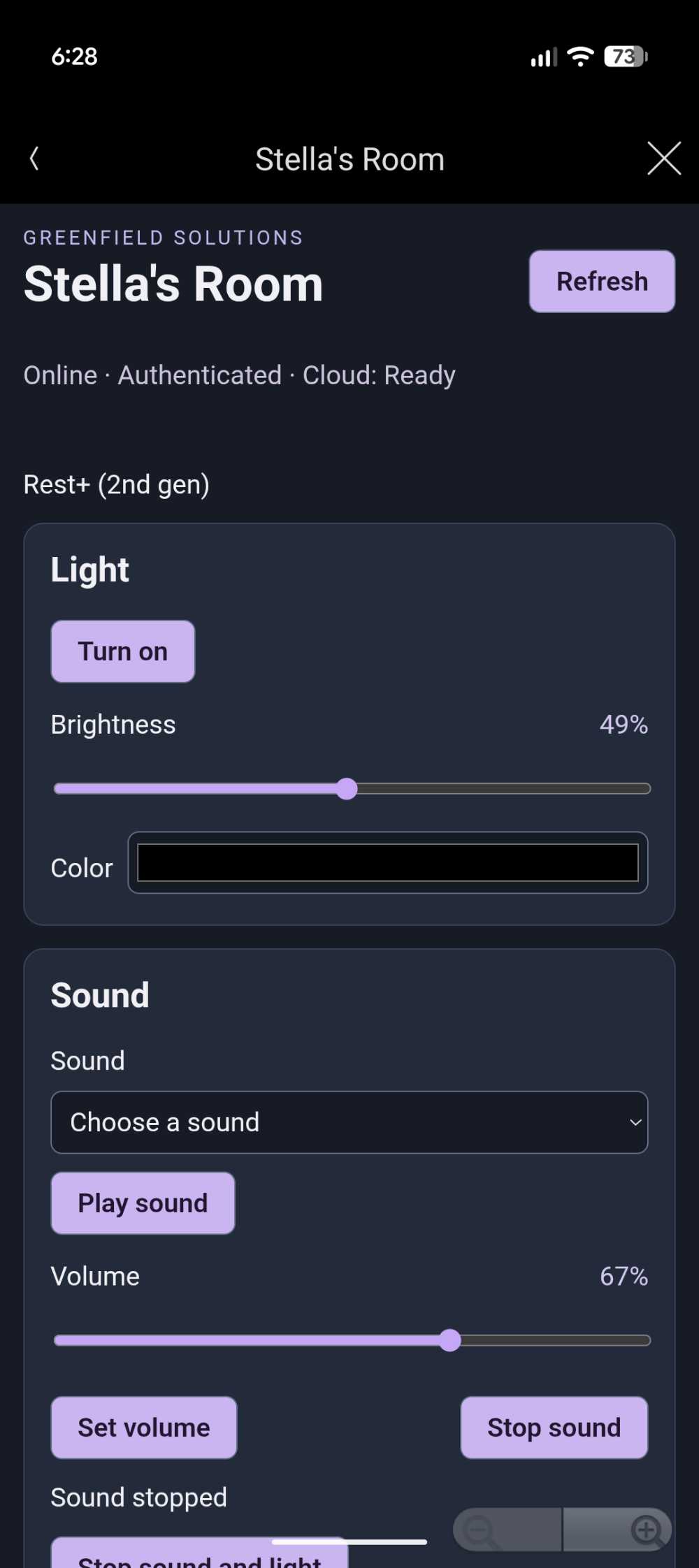
Open Hatch for model-appropriate light, sound, favorite/routine and sleep-timer controls. Refresh reads the selected device again. Controls require a current online device report.
- Brightness and volume: 0–100.
- RGB components: 0–255.
- Sounds: select a named track; the displayed ID is also usable in Composer Programming. Mini/Rest+ use built-in lists; newer products fetch their catalogs. Volume changes do not restart playback.
- Favorites/routines: select an existing item from the Hatch app. Names and IDs are discovered; creation stays in the app.
- Stop sound preserves the light. Stop sound and light stops the current session.
- Sleep timer: 0–1440 minutes; 0 cancels. Expiry stops sound and light.
The sleep timer runs on the Control4 controller. It is cancelled when the driver restarts, credentials change, or another device is selected. Turning the light off normally leaves sound unchanged.
Light Proxy
Hatch Light provides standard light on/off, dimming and RGB color on light-equipped products. Both interfaces share the same state and cloud connection. Control4 XY commands are translated to the device's RGB values. These cloud schemas do not expose a native Kelvin control.
Commands send partial desired-state updates so unrelated settings are preserved. Feedback comes from the device's reported shadow, not cloud acceptance alone. Changes in the Hatch app arrive over MQTT; periodic shadow reads provide a fallback. Timed fades, advanced scene execution and load grouping are not implemented. First-generation Rest+ has a master power flag; waking it can resume its selected sound.
Driver Properties
| Property | Default / purpose |
|---|---|
| Driver Version | Installed source version. |
| Hatch Account Email / Password | Hatch login credentials. |
| Auth Status | Authentication result. |
| Discovered Devices | Devices found on the signed-in account. |
| Device MAC / ID | Selected MAC; must match a device discovered on this account. |
| Device Product / Device Model / Firmware | Discovered product mapping and reported firmware. |
| Auto Rename Device | True; names the visible button and light proxy from the selected Hatch device. |
| Poll Interval (Seconds) | 10; range 5–300; fallback shadow read interval. |
| Connection Status | MQTT is available and the selected device reports connected. |
| Cloud Connection | Current connection stage: token, credentials, TLS, WebSocket, MQTT, shadow subscription, Ready, or retry delay. Ready alone does not mean the device is online. |
| Last Error | Latest authentication, discovery, or control error. |
| Debug Mode | Off, Print, C4 Log, or Both; automatically disabled after 45 minutes. |
| Debug Level | 2 - Warning; available levels 0–5. |
Actions and Programming
Actions: Discover Hatch Devices, Refresh Device State, Reconnect to Hatch.
Device-specific commands:
- Play Sound Effect: discovered Track ID and Volume; ID 0 stops sound.
- Set Volume: volume only, without restarting a track.
- Stop Sound: stops audio while preserving a lit device.
- Stop All: stops sound and light.
- Activate Routine: discovered favorite/routine ID.
- Set Sleep Timer: Minutes; 0 cancels.
Events: Sound Track Changed, Routine Activated, Connected, Disconnected. Routine Activated fires when a newer device report identifies the requested routine playing; it does not indicate completion.
Troubleshooting
- Missing Credentials / Authentication Failed: verify the email/password in the Hatch app, then select Reconnect to Hatch.
- Session Rejected: Hatch rejected the session after one renewed login. Resolve account issues in the Hatch app and reconnect.
- No devices found: check the account and device cloud connectivity, then run discovery again.
- Offline: verify the device in the Hatch app, controller Internet access and selected MAC. Cloud availability alone does not make a disconnected device online.
- AWS IoT timeout: check Cloud Connection and Last Error. Each connection stage has a separate 30-second deadline. TLS timeouts occur before the secure connection opens; check controller DNS, TCP 443 access and date/time. The driver bundles AWS root certificates and verifies the server certificate. WebSocket, MQTT and shadow-subscription timeouts identify later setup stages.
- Connection diagnostics: set Debug Mode to Print or Both and Debug Level to 4 - Debug, then run Reconnect to Hatch. Logs show the stage, AWS endpoint, binding, received byte counts and MQTT CONNECT progress without signed URLs or payloads. Unexpected Lua errors identify the stage and source line when available. Provide these logs with the Control4 OS version if connection still fails.
- AWS WebSocket HTTP 403: check the controller clock and Hatch account access, then reconnect. Signing uses the region and endpoint supplied by Hatch.
- Names unchanged: enable Auto Rename Device, select the device again or run discovery, then refresh Navigators. Both visible proxies are renamed as soon as their bindings are available.
- Rate limited: requests back off up to three times, honoring Retry-After. Login failures have a cooldown; network reconnects back off to five minutes.
- Sound/routine catalog unavailable: use Discover Hatch Devices to reload it. Existing playback, volume and lighting remain available. Newer Restore catalogs contain free content; subscription playback uses app favorites.
- Command not reported: cloud acceptance did not produce the expected device feedback within 25 seconds. The queued commands are discarded; refresh before retrying.
- Controls unavailable: wait for the first successful device-state read.
- WebView unavailable: refresh Navigators and use a supported Control4 app or touchscreen.
For support, provide the driver version, Control4 OS version, Hatch model/firmware, Cloud Connection, and Last Error to Greenfield Solutions. Do not include the account password or authentication tokens.