

SONY BRAVIA TV DRIVER / CONTROL4

Bring Sony remote activity, on-screen alerts, physical IR backup and deeper TV programming into your Control4 installations.


Make the TV part of the room. The Cindev Sony BRAVIA TV driver connects everyday TV use with Control4 room actions, on-screen notifications and more flexible installation options.
Build on familiar power, input, volume and app control with room-follow actions, camera snapshots and messages on the TV, IP-to-IR fallback, customizable remote shortcuts, and additional TV settings and feedback in Composer.


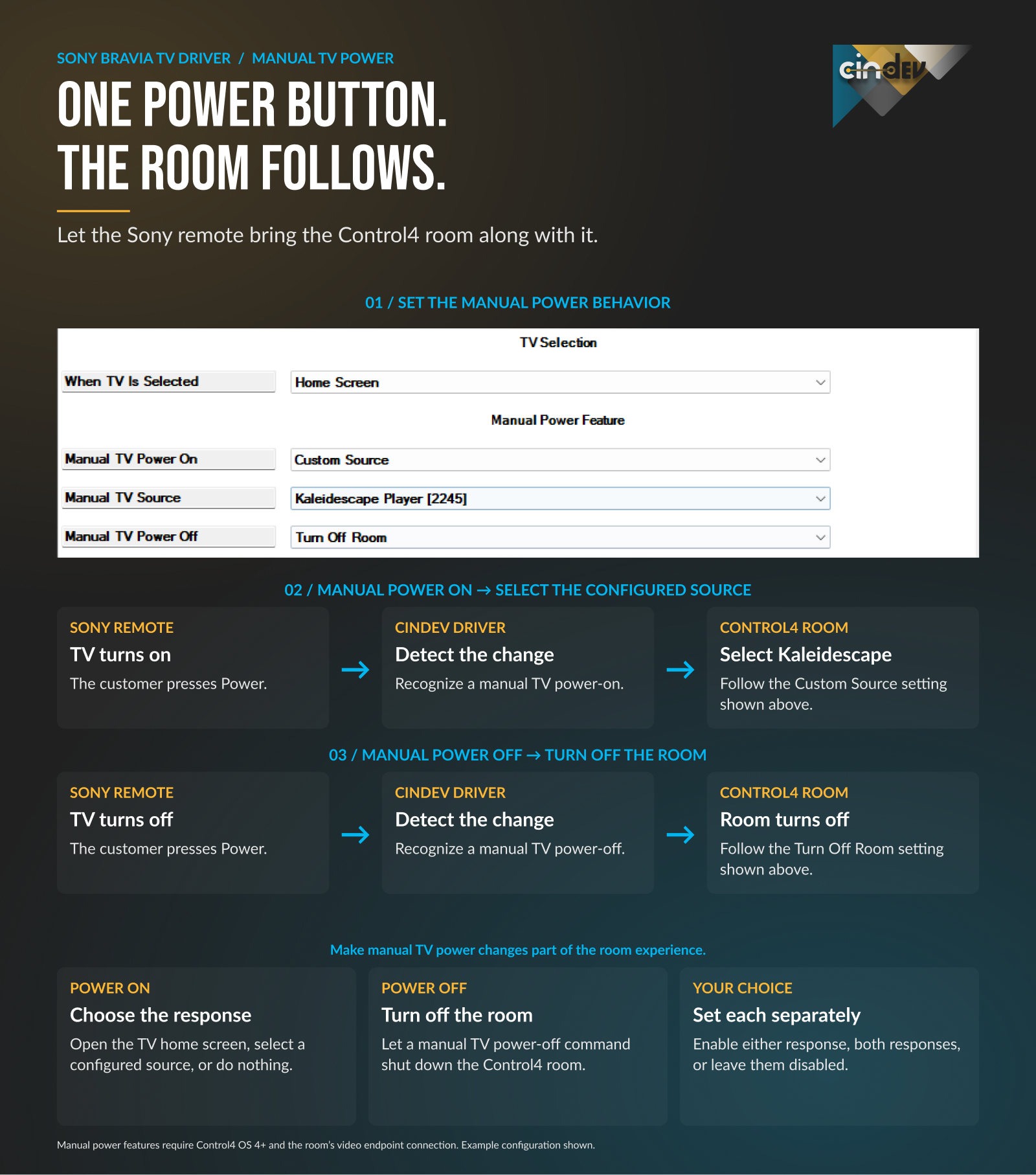
Let the Control4 room follow power changes made with the Sony remote. Power on to open Sony Home or start a Watch source such as Apple TV. Power off to turn off the Control4 room. Requires Control4 OS 4+ and a room connection.

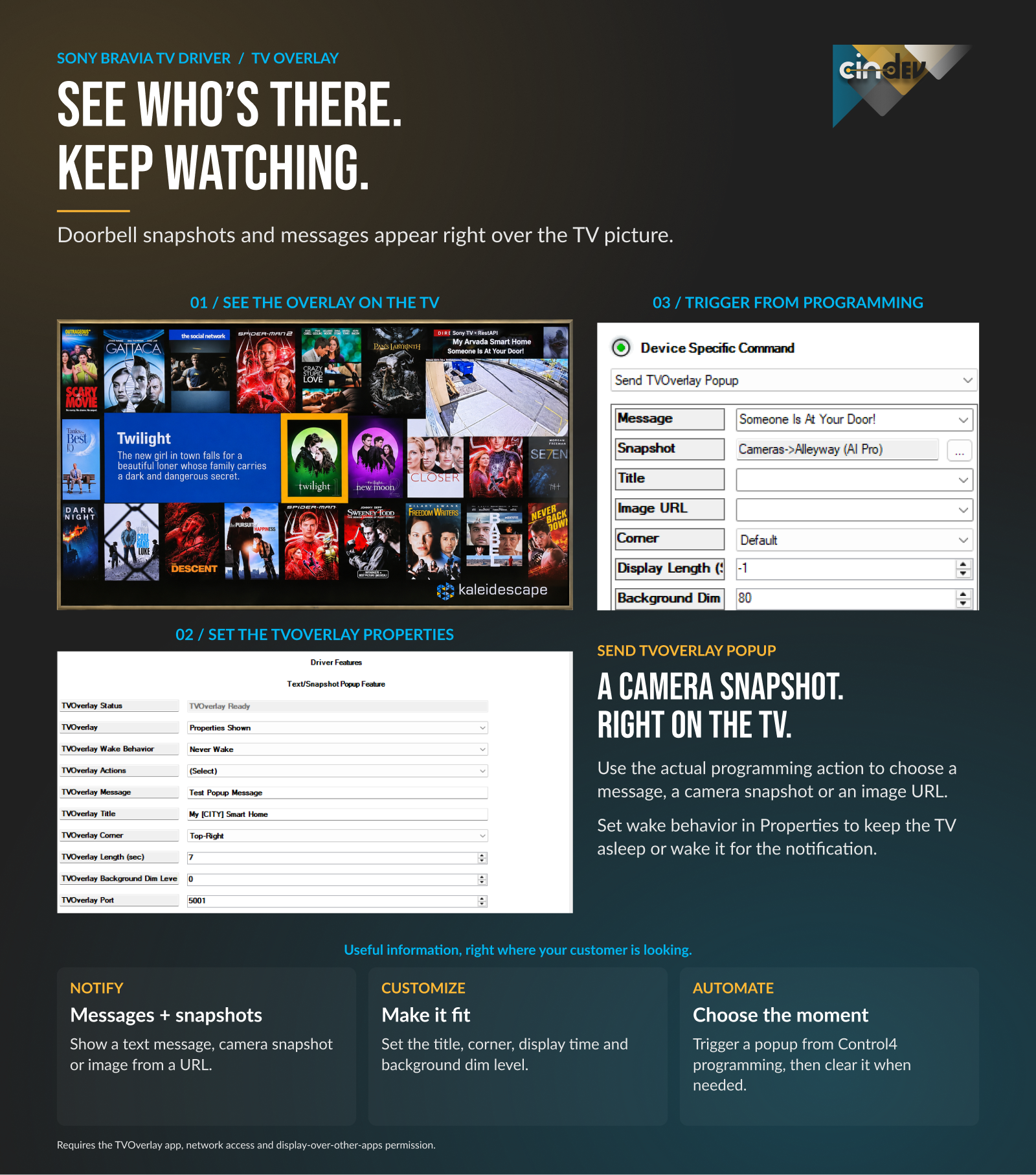
Display a doorbell camera snapshot, garage-door reminder or household message over the picture. Choose the corner, display duration and background dimming. Leave a sleeping TV alone, or wake it for a popup and optionally return it to standby. Requires the TVOverlay app installed and configured on the TV.

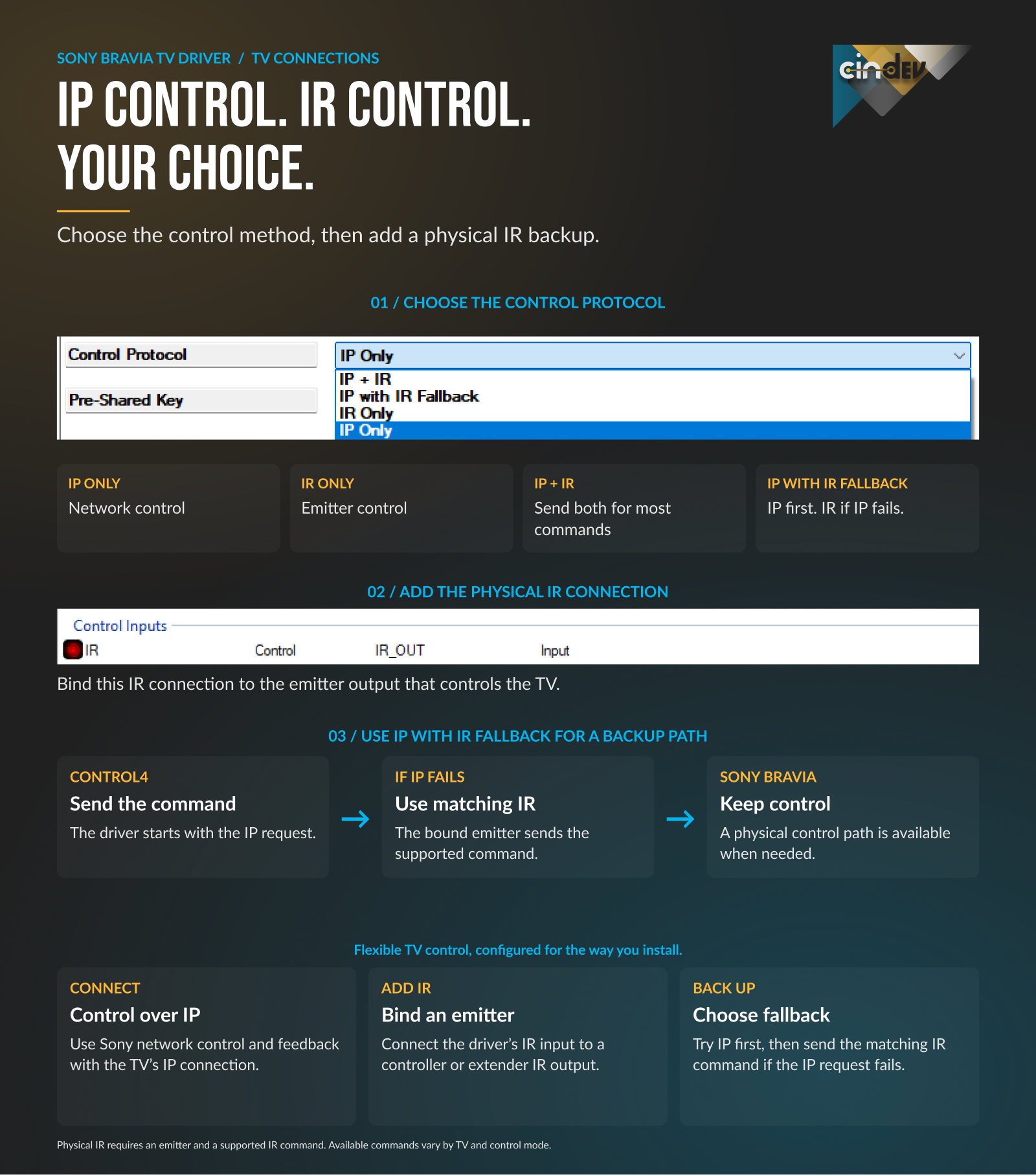
Choose IP only, IR only, both, or a matching IR command when an IP command fails. Physical IR operation requires an emitter and a supported IR code.

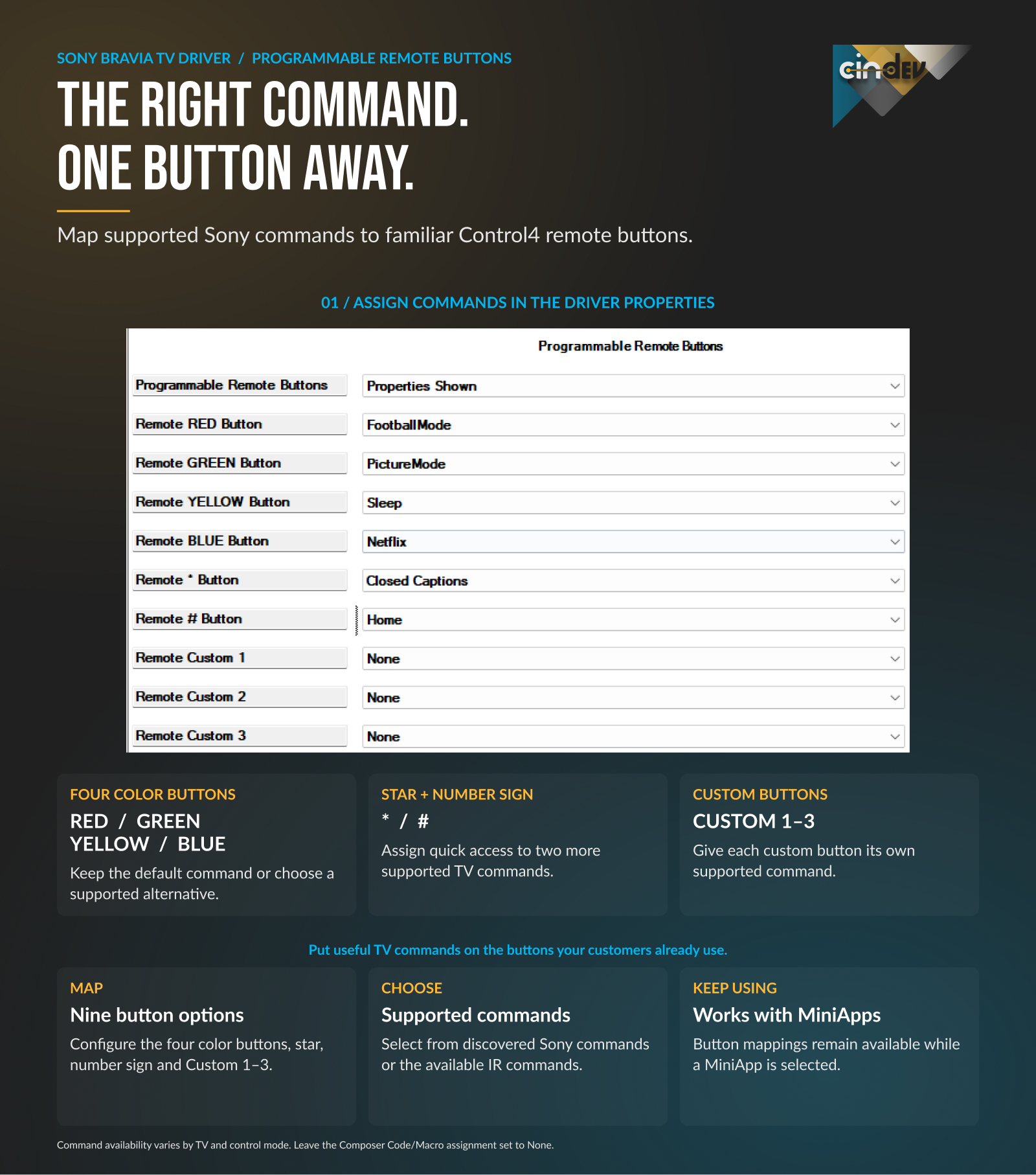
Map color, *, # and custom buttons to supported Sony commands, including Home and the input menu. The mappings also work with MiniApps.

Set supported picture modes, brightness, sound and speaker settings. React to picture-mode, audio-output or HDMI-signal changes in Control4 programming. For example, dim the lights when Cinema mode is selected. Availability varies by TV, firmware and input.

Check connection, power, reported source and API status; discover apps and commands; and inspect command results. Block Control4 TV commands, or keep the TV off when power feedback is available.

Make installed streaming apps available as Watch sources with up to 25 MiniApp connections, or launch installed apps from Control4 programming. On supported TV models, open a website or send text to an active TV keyboard.

Use Control4 to power the TV, select HDMI inputs, tune available channels, adjust volume or mute, navigate Sony menus and use playback controls.
Power, input selection, volume and mute, remote navigation, direct channel tuning, IP app launch, and up to 25 MiniApp bindings for the Watch menu are supported by both compared drivers.
THE UPGRADE VALUE

Choose Cindev when the installation needs the Sony remote, TV screen and Control4 room to work together.
Comparison covers Control4’s Sony XR-98X90L driver v304 and Cindev v20261102. Free-driver capabilities vary by model.
| Capability | Free Control4 driver | Cindev driver |
|---|---|---|
| Everyday TV controls | Power, input, volume, mute, navigation and channel tuning | Power, input, volume, mute, navigation and channel tuning |
| Apps in the Watch menu | Direct IP app launch; up to 25 MiniApp bindings | Direct IP app launch; up to 25 MiniApp bindings |
| Control paths | Choose network or IR; tunable retries for selected IP commands | IP only, IR only, both, or matching IR fallback after an IP failure¹ |
| TV-led room actions | Not listed² | Open Sony Home or a Watch source at TV power-on; room off at TV power-off³ |
| On-screen notifications | Not listed² | Camera snapshots and messages, with placement and timing controls⁴ |
| Remote shortcuts | Not listed² | Map color, *, # and custom buttons; works with MiniApps |
| TV programming | Sony Web IP commands, app launch and Sony scene presets | Supported picture, sound and speaker settings; HDMI signal and audio-output changes |
| Installation feedback | SDDP discovery and identification using Sony’s Web API | Reported TV source, API status, command results and temporary command blocking |
¹ Emitter and supported IR code required. ² Not listed in the sales-sheet comparison for this Control4 driver. ³ Control4 OS 4+ and a room connection required. ⁴ TVOverlay must be installed and configured. Features vary by model, firmware and input.
PLAN THE INSTALLATION

For IP features, use a Sony BRAVIA TV that supports Sony REST/IRCC control and pre-shared-key authentication. Confirm those capabilities on the exact TV model and firmware before installation.
Feature availability varies by model, firmware and input. The BRAVIA name or a Google TV / Android TV label alone does not establish support for every driver feature.


OS 3.3.0 or later for the driver. OS 4+ and a room connection for room-follow actions.

DriverCentral Cloud driver plus a Cindev license or trial for product 953.

A BRAVIA with Sony REST/IRCC and pre-shared-key authentication for IP features. Configure the TV’s IP control and use the same key in the driver.

Install and configure the TVOverlay app on the TV.

An IR emitter and a supported code for IR operation or IP-to-IR fallback.

1. Confirm Sony REST/IRCC and pre-shared-key support on the exact TV.
2. Configure IP control and enter the matching key in the driver.
3. Add the DriverCentral Cloud driver and activate a license or trial.
4. Configure room actions, TVOverlay and physical IR as needed.
5. Test the selected features on the installed TV and firmware.
COMMON QUESTIONS


Yes. Both compared drivers support direct app launch over IP and up to 25 MiniApp bindings. Cindev’s upgrade value is the additional room behavior, on-screen alerts, IR options, remote mappings and programming features.

With Cindev room-follow actions configured, turning the TV off can shut down the Control4 room. This feature requires Control4 OS 4+ and a room connection.

The driver’s popups require the TVOverlay app to be installed and configured. Confirm app availability and the desired behavior on the exact TV.

No. Verify Sony REST/IRCC and pre-shared-key support, then check the features needed for the installation. Model, firmware and input can affect availability.

Ready to make the room respond?
Check your TV’s compatibility, activate a license or trial, and configure the Cindev Sony BRAVIA TV driver.

A single license will unlock as many instances of the driver as needed in your project. Cloud Driver is required to activate all DriverCentral licenses and trials.
Learn more about DriverCentral features, or watch the quick licensing video to see the activation process.

All Cinegration Development drivers for Control4 come with a 30-day trial. Simply add the DriverCentral licensing driver along with this driver and you can fully test the driver before purchasing.
Including Cinegration Development drivers in your showroom project will give you unlimited use without purchase.
Driver is provided by Cinegration Development LLC. All rights reserved.
No posts found
V20261109
- Initial Release
