


LG WebOS TV Driver
Two-way network control for LG WebOS televisions. Power, input selection, volume, mute, channel, navigation, and app launching, with live feedback so the system always reflects what the TV is actually doing — including when someone picks up the TV's own remote. The driver talks to the TV entirely over the local network and selects the best available control method automatically. No cloud service, no account, and no internet access required.
Complete source and input handling
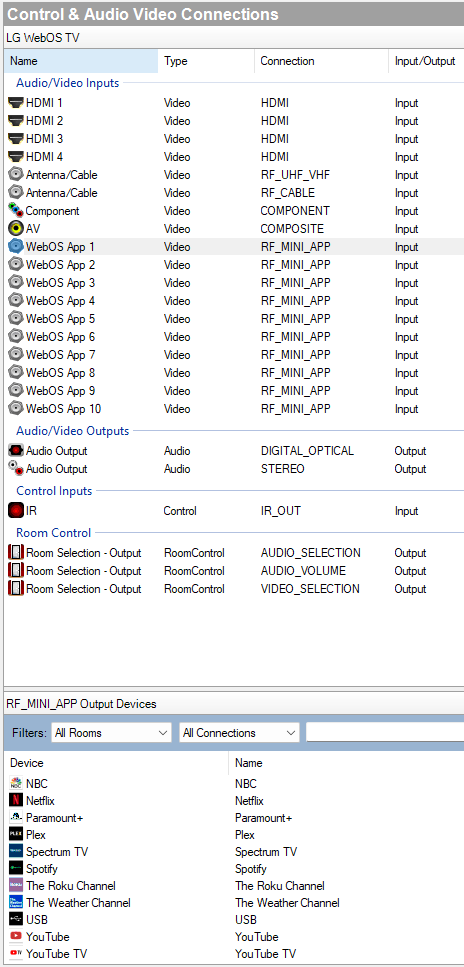
HDMI 1 through 4, the built-in tuner, component, AV, and digital optical or stereo audio output all appear as standard connections. Ten additional app slots let you bind TV app drivers directly, so selecting that input launches the app on the TV.
Accurate power and status
The driver reports what the TV is really doing rather than what it was last told. Connection state is visible at all times, and the driver reconnects on its own when the TV comes back.
Optional infrared backup
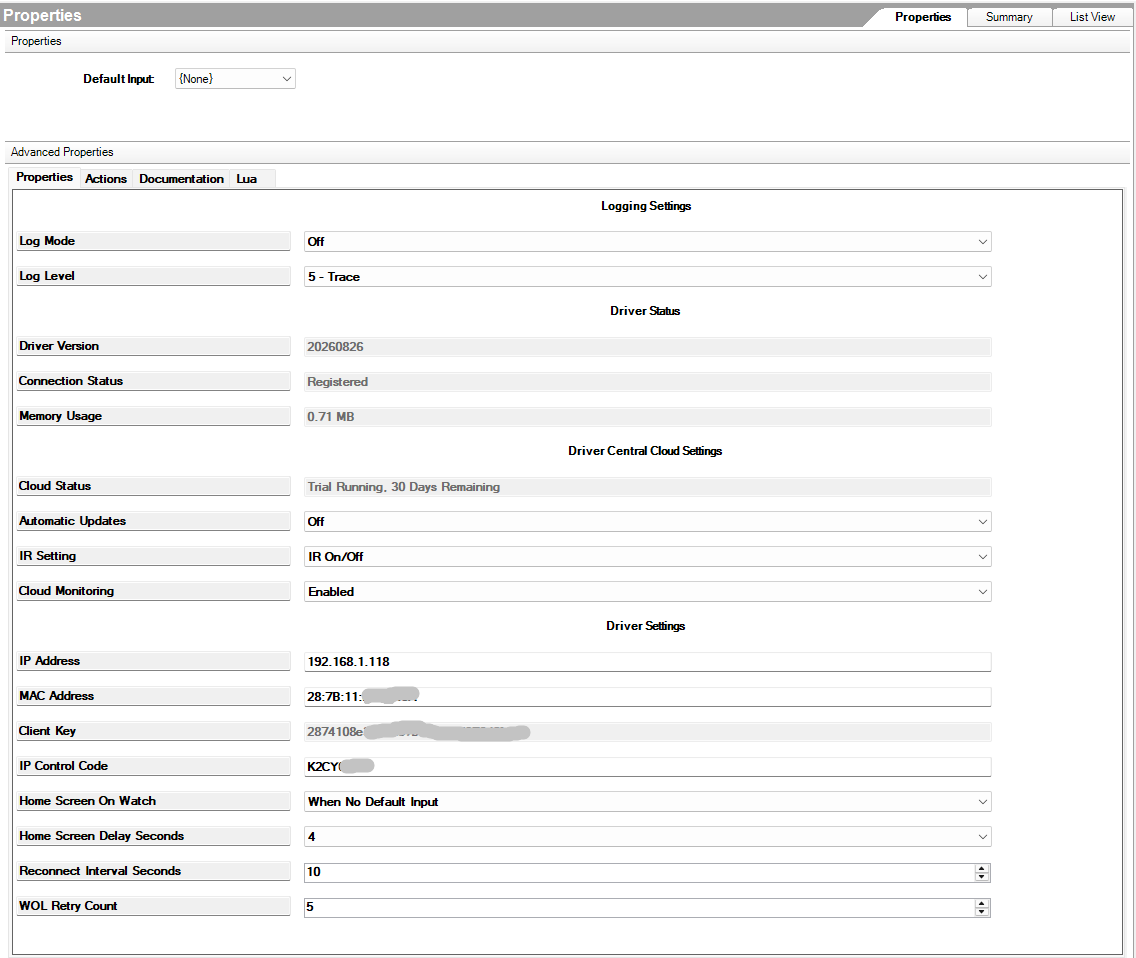
Some televisions do not wake reliably from a network power-on — network equipment can block it, and a TV that has lost its Always Ready setting will not respond at all. The IR Setting property covers that gap without giving up network control:
- Disabled — network control only
- IR WOL Fallback — if the TV does not respond within 8 seconds of a power-on request, an infrared power-on is sent
- IR On/Off — power over infrared, everything else over the network
- IR Full — all commands over infrared; the network is not used at all, and none of the network setup steps are required
IR Full covers the rare case where network control is unavailable or has stopped working, such as pairing cleared by a firmware update or Network IP Control switched off at the set. Any IR mode requires an IR emitter bound to the driver's IR connection and positioned at the TV.
Key features
- Two-way control with live feedback for power, input, volume, mute and channel
- HDMI 1-4, tuner, component, AV, audio output, and room binding
- Ten bindable app slots for launching TV apps from a source selection
- Automatic power-on over the network, with optional infrared backup
- Four selectable infrared modes, from off to fully infrared
- Pairing and settings persist across reboots and driver updates
- MAC address fills in automatically once the TV is reachable
- Self-healing reconnection with a configurable retry interval
- On-screen toast messages, app discovery, and direct remote-key sending
- Memory monitoring and built-in diagnostics
- No cloud service, account, or internet dependency
Common uses
- Standard TV control in any room, with reliable state in the interface
- Launching streaming apps directly from a source selection
- Whole-house off scenes that reliably turn LG sets off and keep them off
- Sets on isolated or filtered network segments where power-on needs an infrared assist
- Older or firmware-changed sets where network control is no longer usable at all
Requirements
- LG TV running WebOS 3.0 or later (2016 models and newer)
- OS 3.3.0 or later
- TV and controller on the same network, reachable directly
- Static IP address or DHCP reservation for the TV
- Infrared modes require an IR emitter bound to the driver's IR connection
Setup
- On the TV, enable Network IP Control and generate a code, then enable Wake on LAN, Always Ready, and TV On With Mobile. The generated code can only be read once — note it before leaving the menu.
- Add the driver to the project. It appears under the Audio/Video category.
- Enter the TV's address and the generated code in the driver properties.
- With the TV powered on, run the Pair TV action and accept the prompt on the TV.
- Bind source devices to the inputs and add the TV to its room.
Full setup, property reference, and troubleshooting are included in the documentation supplied with the driver.
LG and webOS are trademarks of LG Electronics Inc. McGlothlin Inc is an independent developer and is not affiliated with, authorized by, endorsed by, or sponsored by LG Electronics Inc. All product and company names are the trademarks of their respective owners and are used for identification purposes only.
