


One Experience Button driver for your whole icon library. Instead of
installing a separate driver for every scenario button, add this one per
placement and pick the look and behavior with a single **Icon Set**
property.
This driver was developed mainly for remote, vacation and weekend houses,
but most of the icon sets work in any project. I built an extra room, the
"Control Room", where I display the icon for every variable I use in my
project, so I can control the whole house from one place.
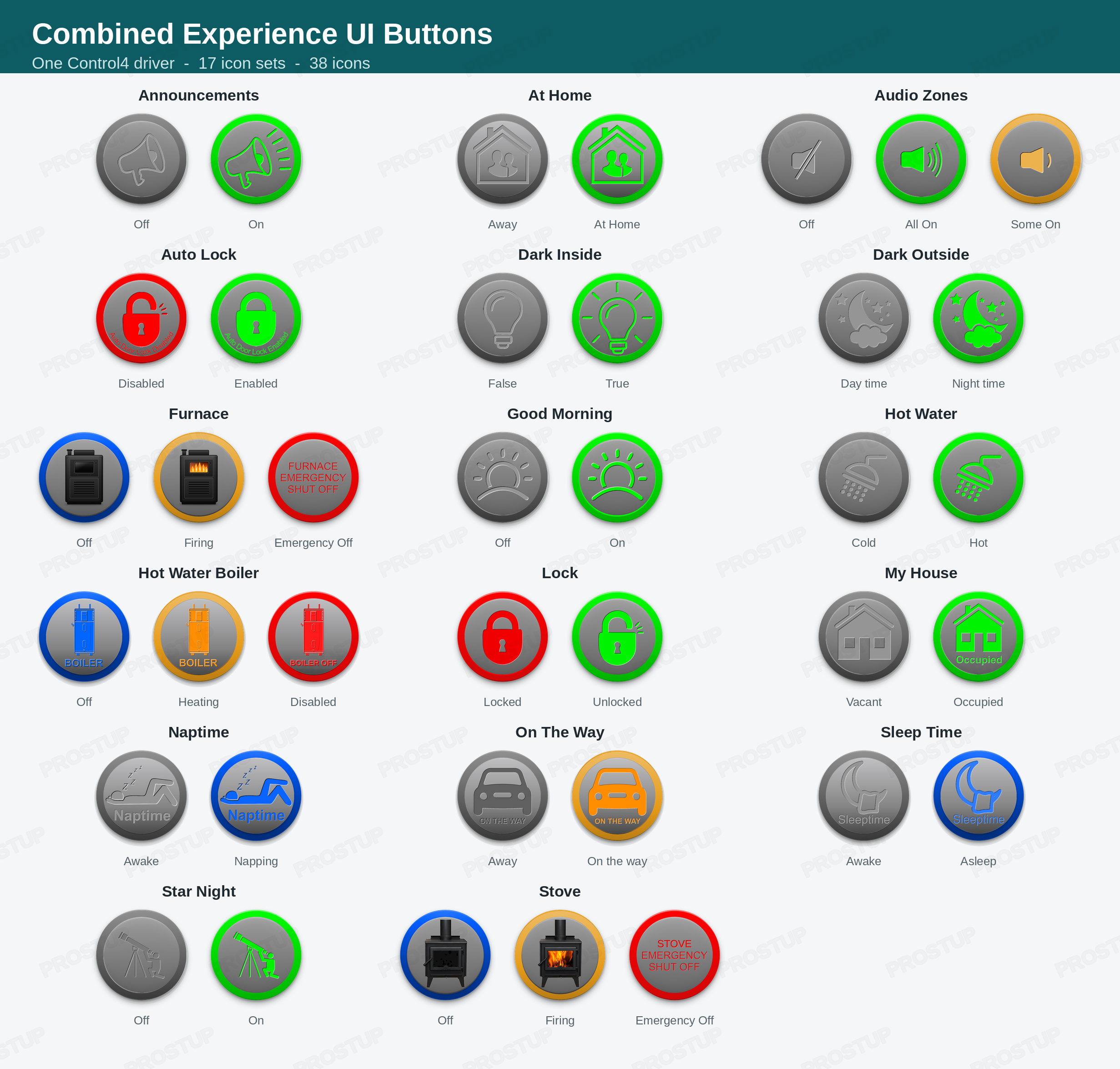
**17 icon sets, 38 icons:** Announcements, At Home, Audio Zones, Auto Lock,
Dark Inside, Dark Outside, Furnace, Good Morning, Hot Water, Hot Water
Boiler, Lock, My House, Naptime, On The Way, Sleep Time, Star Night, Stove.
Furnace, Stove, Hot Water Boiler and Audio Zones are three-state buttons
(for example Off / Firing / Emergency Off).
**Four ways to drive a button**
- **Touch:** tap the button on any Control4 screen or app.
- **Connections:** follow a light switch or relay (Enable Switch) and a
contact sensor (Contact Sensor) such as the C4-Z2IO or C4-Z2C, or any
generic contact sensor.
- **Linked Variable (two-way):** link the button to a project variable or a
device variable. Tapping the button changes the variable, and a change to
the variable from anywhere else updates the icon.
- **Programming:** SetState, SetStateByName and ToggleState commands, plus
state events and a State Token conditional.
**Built for installers**
- Automatic device naming from the room and icon set.
- On-screen text for every state, editable per placement.
- Two variables for programming: friendly text that reads naturally, and a
rename-proof state token.
- Keypad button links for toggle, on and off.
- Consistent icon colors across the whole library: gray off, green on,
blue, orange and red for heating and emergency states.
installing a separate driver for every scenario button, add this one per
placement and pick the look and behavior with a single **Icon Set**
property.
This driver was developed mainly for remote, vacation and weekend houses,
but most of the icon sets work in any project. I built an extra room, the
"Control Room", where I display the icon for every variable I use in my
project, so I can control the whole house from one place.
**17 icon sets, 38 icons:** Announcements, At Home, Audio Zones, Auto Lock,
Dark Inside, Dark Outside, Furnace, Good Morning, Hot Water, Hot Water
Boiler, Lock, My House, Naptime, On The Way, Sleep Time, Star Night, Stove.
Furnace, Stove, Hot Water Boiler and Audio Zones are three-state buttons
(for example Off / Firing / Emergency Off).
**Four ways to drive a button**
- **Touch:** tap the button on any Control4 screen or app.
- **Connections:** follow a light switch or relay (Enable Switch) and a
contact sensor (Contact Sensor) such as the C4-Z2IO or C4-Z2C, or any
generic contact sensor.
- **Linked Variable (two-way):** link the button to a project variable or a
device variable. Tapping the button changes the variable, and a change to
the variable from anywhere else updates the icon.
- **Programming:** SetState, SetStateByName and ToggleState commands, plus
state events and a State Token conditional.
**Built for installers**
- Automatic device naming from the room and icon set.
- On-screen text for every state, editable per placement.
- Two variables for programming: friendly text that reads naturally, and a
rename-proof state token.
- Keypad button links for toggle, on and off.
- Consistent icon colors across the whole library: gray off, green on,
blue, orange and red for heating and emergency states.
No posts found
